You can record every item or what to do with time, such as work or play.
You can enter the item name your own favorite things.
You can enter up to a maximum of 99 lines.
Can you measure up to 99 hours, 59 minutes and 59 seconds.
If you close the application once, save the current state of the body automatically,
To restore the state of the last When you start the app again.
Has been counted as time continues.
We measured the exact time to get the system time of the body.
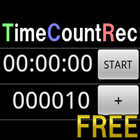
[Button Description]
+TIME :Measurement time will be added.
+SW :Stopwatch will be added.
+COUNT:Counter will be added.
AC :And remove all items.
T/Y :The switching of the ON / OFF of the display date of +TIME.
[Item Description]
When you press the button number to the left, or you can enter the name of the item, remove reset of time, of the item.
+TIME :It measures the time elapsed from the start time and end time you press the START. Will stop when you press the STOP.
S:Start time, E:End time, P:Passage time
+SW :It measures the time in milliseconds by pressing the START. Will stop when you press the STOP.
+COUNT:- You press the -1 count. + When you press the +1 count.
※ For saving the file please buy the paid version.
※ Functionality of the paid version.
Can be saved in txt or csv to SD card recording.
[Description menu button]
Save File : Create a folder on the SD card TimeCountRec, and then save the data.
Delete File : Delete the data saved in the SD card.
When you save the file, press the button and get the date and time, (the current date, hour, minute) input frame is placed in the name.
You can easily save the file with the date and press OK button directly.
Delete files so that come packed with features, you can easily organize files in the SD card.
[File format]
When the file is saved, the file type is csv, txt,
You can select character code UTF-8, Shift-JIS, JIS, EUC-JP.
Line feed code can be selected LF(Android/Linux), CR(Macintosh), CRLF(Windows).
[Example of CSV output files to be saved]
TIME,Name1,S:2012/05/01,13:30:28,E:2012/05/01,14:00:29,P:00:30:01
STOPWATCH,Name2,00:30:01:44
COUNT,Name3,100
※ Access permissions
Storage:Contains in order to save the file to the SD card.
Last updated on 2012年05月20日
此版本包含小幅错误修复和常规改进。请更新至最新版本,以获得更佳体验。