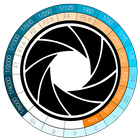
It's a tool for calculate the ratio between aperture (F-Stop) and exposure time (Shutter Speed) in Computer Graphics when using a physical camera (like Vray and other's rendering engine) or in Photography.
How To:
Click on the left or the right Stop-Disc's side until matching the F-stop values and the Shutter Speed you have previously set in your camera, or physical camera if you used a rendering engine.
Up to this point, you will get all the matching values on the Stop-Disc.
Choose the new F-Stop value on the Stop-Disc.
You will get the matching Shutter Speed value needed to get the same camera esposition's starting setting.
It's very useful if you want to get the F-Stop value in order to increase the Depth of Field.
Last updated on Jul 31, 2015
이 버전에는 사소한 버그 수정과 전반적인 개선 사항이 포함되어 있습니다. 최상의 환경을 위해 최신 버전으로 업데이트하세요.



APKPure - 안드로이드를 중심으로 한 멀티플랫폼 앱스토어로, 다양한 앱 관련 콘텐츠를 제공합니다. 더 쉽고, 빠르고, 안전하게 원하는 앱을 찾아보세요. 빠르고 효율적인 다운로드와 설치가 가능합니다.