
Easy Answer - Answer your calls without touching the screen or even the phone!
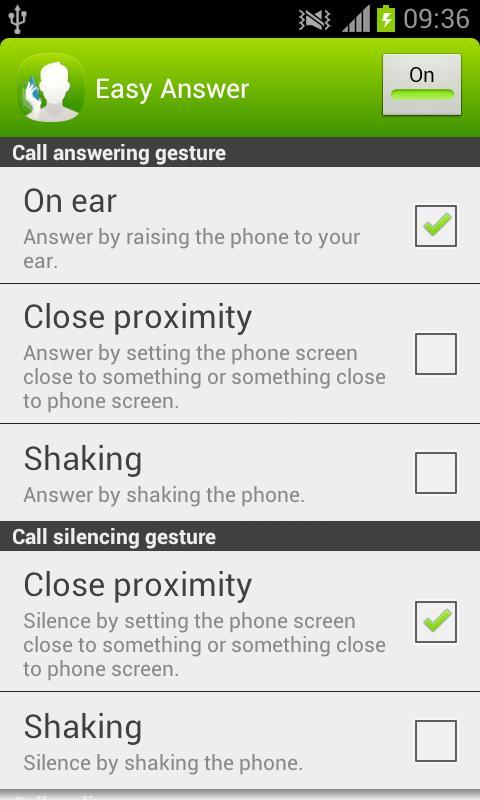
Easy Answer allows you to answer and silence incoming calls, as well as end the ongoing call without touching the screen. Optionally, you can set speaker to be enabled automatically when answering the call with Easy Answer gesture. This all becomes handy when you have dirty hands, you are wearing gloves or you are otherwise unable or unwilling to touch the screen. Easy Answer is also easy to switch off when not needed - no uninstallation is required and selected gestures remain selected until Easy Answer is turned back on next time.
You can e.g. answer just by raising the phone to your ear (requires choosing "On ear" as answering gesture) and end the call just by lifting the phone away from your ear (requires choosing "Off ear" as ending gesture). Or if you want to silence the ringing, just put your hand close to the screen, slide your hand across the phone screen without touching it or flip the phone over if it is on the table (all the listed silencing gestures require choosing "Close proximity" as silencing gesture).
If your phone usually lays on the table and you prefer using the speaker, just enable the speaker from Easy Answer options and then answer and end the call by putting your hand close to the screen e.g. slide your hand across the phone screen without touching it (requires choosing "Close proximity" as answering and ending gesture). These same settings can be handy also when e.g. driving the car with the phone in its holder.
Be careful not to end the call by accident with the call ending gestures "Off ear" and "Close proximity" e.g. lifting phone away from ear even for a moment when using "Off ear" or flipping the phone when using "Close proximity".
Notice: Easy Answer has not been tested on Android 4.1 (Jelly Bean) or newer operating system versions, and therefore may not work on such devices.
Notice: Easy Answer may not work properly together with other similar applications or with some of the (microphone) headsets or similar accessories.
Last updated on Jul 30, 2015
이 버전에는 사소한 버그 수정과 전반적인 개선 사항이 포함되어 있습니다. 최상의 환경을 위해 최신 버전으로 업데이트하세요.



APKPure - 안드로이드를 중심으로 한 멀티플랫폼 앱스토어로, 다양한 앱 관련 콘텐츠를 제공합니다. 더 쉽고, 빠르고, 안전하게 원하는 앱을 찾아보세요. 빠르고 효율적인 다운로드와 설치가 가능합니다.