Easy Answer - Answer your calls without touching the screen or even the phone!
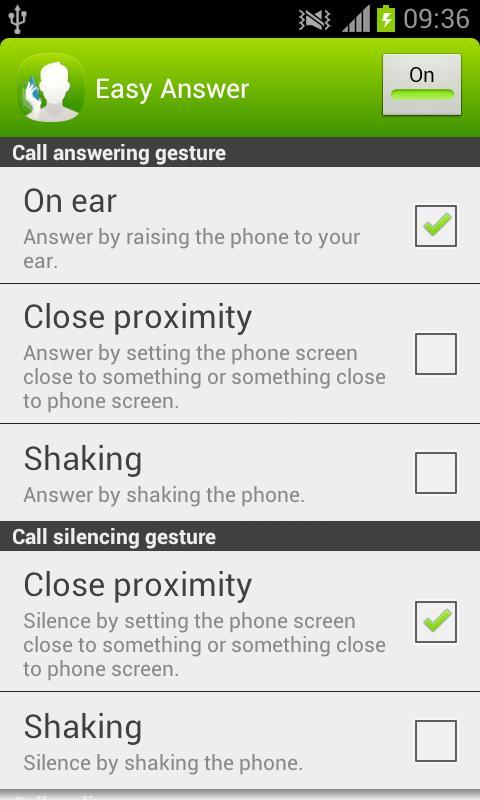
Easy Answer allows you to answer and silence incoming calls, as well as end the ongoing call without touching the screen. Optionally, you can set speaker to be enabled automatically when answering the call with Easy Answer gesture. This all becomes handy when you have dirty hands, you are wearing gloves or you are otherwise unable or unwilling to touch the screen. Easy Answer is also easy to switch off when not needed - no uninstallation is required and selected gestures remain selected until Easy Answer is turned back on next time.
You can e.g. answer just by raising the phone to your ear (requires choosing "On ear" as answering gesture) and end the call just by lifting the phone away from your ear (requires choosing "Off ear" as ending gesture). Or if you want to silence the ringing, just put your hand close to the screen, slide your hand across the phone screen without touching it or flip the phone over if it is on the table (all the listed silencing gestures require choosing "Close proximity" as silencing gesture).
If your phone usually lays on the table and you prefer using the speaker, just enable the speaker from Easy Answer options and then answer and end the call by putting your hand close to the screen e.g. slide your hand across the phone screen without touching it (requires choosing "Close proximity" as answering and ending gesture). These same settings can be handy also when e.g. driving the car with the phone in its holder.
Be careful not to end the call by accident with the call ending gestures "Off ear" and "Close proximity" e.g. lifting phone away from ear even for a moment when using "Off ear" or flipping the phone when using "Close proximity".
Notice: Easy Answer has not been tested on Android 4.1 (Jelly Bean) or newer operating system versions, and therefore may not work on such devices.
Notice: Easy Answer may not work properly together with other similar applications or with some of the (microphone) headsets or similar accessories.
Aktuelle Version
1.0.1Von hochgeladen
Naing Win Tun
Erforderliche Android-Version
Android 2.2+
Kategorie
Gratis Tools APPAltersfreigabe
Unrated · Warning – content has not yet been rated. Unrated apps may potentially contain content appropriate for mature audiences only.
Last updated on Jul 30, 2015
Diese Version enthält kleinere Fehlerbehebungen und allgemeine Verbesserungen. Aktualisiere auf die neueste Version, um die bestmögliche Nutzererfahrung zu erhalten.



APKPure – Ein plattformübergreifender App-Store mit Fokus auf Android, der eine Vielzahl an Apps und relevanten Inhalten bietet. Entdecken Ihre gewünschte App, laden und installieren Sie schneller, sicherer und effizienter.