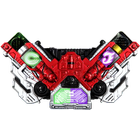
Simple animation henshin belt kamen rider double.
To use :
1. Click Gaia Memories (left up).
2. Select one of Gaia Memories.
3. If two Gaia Memories selected, click driver to hear sound henshin kamen rider double.
4. After finish, repeat the first step to hear other sound.
To set ringtone
1. Click optionmenu, chose select ringtone.
2. Click item to hear sound.
3. Long click item to set sound ringtone.
More info and updates :
#Twitter : https://twitter.com/SoulitCreative
#Google+ : https://plus.google.com/102309998161614527743/posts
Latest Version
1.2Uploaded by
Thao Huynh
Requires Android
Android 2.3.2+
Category
Free Entertainment AppReport
Flag as inappropriateLast updated on Jul 4, 2015
1.2 GridView in ringtone
1.1 Add more ringtone (total 149 ringtone)
1.0.2 Fix error
1.0.1 Fix error




APKPure - A multi-platform app store primarily focused on Android, providing extensive app-related content. Discover the app you want easier, faster, and safer, with quick and efficient downloads and installations.