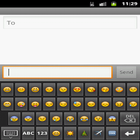
Its a custom keyboard application .you can use it instead of default keyboard.It has all default feature of soft keyboard with some extra feature like all Emoji,s,Smileys and Facebook hands.
Steps For Installation:
1.Install the APK.
2.Then Go to settings.
3.Then select Language and keyboard.
4.Then check the custom keyboard check box and select OK.
5.For fist time you have check the input method(custom keyboard).
Latest Version
2.0Uploaded by
Dinesh Patel
Requires Android
Android 2.1+
Category
Free Business AppContent Rating
Unrated · Warning – content has not yet been rated. Unrated apps may potentially contain content appropriate for mature audiences only.
Report
Flag as inappropriateLast updated on Apr 6, 2016
Facebook icons added.



APKPure - A multi-platform app store primarily focused on Android, providing extensive app-related content. Discover the app you want easier, faster, and safer, with quick and efficient downloads and installations.