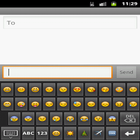
Its a custom keyboard application .you can use it instead of default keyboard.It has all default feature of soft keyboard with some extra feature like all Emoji,s,Smileys and Facebook hands.
Steps For Installation:
1.Install the APK.
2.Then Go to settings.
3.Then select Language and keyboard.
4.Then check the custom keyboard check box and select OK.
5.For fist time you have check the input method(custom keyboard).
最終のバージョン
2.0投稿者
Dinesh Patel
Android 要件
Android 2.1+
カテゴリー
フリー ビジネス アプリコンテンツのレーティング
Unrated · Warning – content has not yet been rated. Unrated apps may potentially contain content appropriate for mature audiences only.
Last updated on 2016年04月06日
Facebook icons added.



APKPure - Androidを中心としたマルチプラットフォームのアプリストアで、豊富なアプリ関連コンテンツを提供しています。より簡単に、より速く、より安全にアプリを見つけることができ、ダウンロードとインストールも迅速かつ効率的です。