

KernelSU integrates superuser control into the Linux kernel so privileged requests are evaluated closer to the system core. The manager focuses on clear decisions for each app while keeping unauthorized apps unaware of root. You can adjust permissions, load systemless modules, and apply changes without rewriting system partitions. The project aims to reduce root detectability while keeping your controls simple. Therefore, advanced users can configure a precise and stable root environment for daily tasks. Get the KernelSU APK on APKPure to begin with a focused setup that supports practical root workflows.
Kernel level su integration
KernelSU places su logic inside the kernel, which provides deeper mediation of userspace requests on supported devices. This approach aims to improve stability so root actions are enforced consistently. It also helps reduce interference by regular apps.
Per app root control
KernelSU lets you decide which apps can request su and which cannot. Approved apps see su and can ask for privileges. Others remain unaware, which helps contain risk and also reduces detection by apps that scan for root.
Customizable privileges and policies
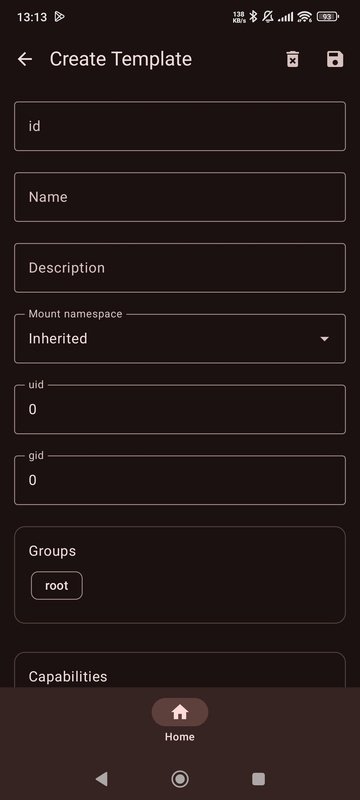
You can fine tune uid, gid, groups, capabilities, and SELinux rules per app. This allows minimal privileges for each tool so access is no broader than needed. Moreover, you can review and adjust decisions at any time in the manager.
Systemless modules with metamodules
KernelSU supports a metamodule framework so you can modify system behavior without touching partitions. For example, meta overlayfs can mount overlays to replace files under system paths at boot. Always enable modules carefully to avoid boot issues.
Stealth oriented root profile
KernelSU aims to keep su hidden from regular apps and games that do not have permission. This helps reduce simple detection methods. It also allows you to continue using apps that are sensitive to root checks within reasonable limits.
Guided setup and management
You can patch init boot or boot images on device, then flash with Fastboot or ADB. After setup, the KernelSU Manager gives a clear interface for permissions, logs, and modules. Therefore, ongoing adjustments are straightforward.
KernelSU and Magisk both manage root but their approaches differ. KernelSU places su in the kernel, while Magisk mainly operates in userspace with wide device coverage. KernelSU focuses on per app visibility, customizable privileges, and a systemless metamodule model, while Magisk offers a large module ecosystem with broad community support. Detection profiles and compatibility vary by device and setup. Choose based on your priorities, then download KernelSU if kernel level control and per app isolation are key for your use case.
A reported authentication weakness showed that a manager app could be validated by scanning the path under data app base apk, which might allow a malicious app to masquerade as the manager. KernelSU continues to harden checks, so always use the KernelSU APK latest version and verify the APK signature before granting trust. In addition, grant su only to apps you fully understand, review logs regularly, and avoid repacked or modified builds. Keep modules minimal, and remove those you do not need to reduce the attack surface.
KernelSU modules mount at boot so changes take effect without rewriting system partitions. With meta overlayfs, you can overlay files under system to replace or add resources. Practical use cases include changing fonts, replacing app resources, applying hosts based rules, and testing configuration files. Start with small changes and reboot to confirm stability. If a module causes issues, disable it from the manager and reboot to restore normal behavior.
This quick guide explains the basic flow from download to daily control. Read each step carefully before you start. Always back up your data and confirm device compatibility.
KernelSU provides kernel level superuser control, per app isolation, and systemless modules for practical customization. Get the KernelSU APK on APKPure to set up, manage permissions, and keep modules in check with a clear workflow.
What does KernelSU do?
KernelSU runs superuser control inside the Linux kernel and manages which apps can request root. It provides per app permission decisions, customizable privilege scopes, and systemless modules for changes that do not rewrite partitions. Therefore, KernelSU helps you build a controlled, minimal root setup on supported devices.
How safe is KernelSU?
KernelSU can be safe when configured carefully, but it depends on your practices and modules. A reported issue showed a possible authentication weakness where a malicious app could masquerade as the manager by leveraging a scan of data app base apk paths. Use the KernelSU APK latest version, verify the APK signature, restrict su to trusted apps only, review logs, and keep modules minimal to lower risk.
What are the disadvantages of KernelSU?
KernelSU may face risks such as missing or weak authentication between user apps and kernel parts, reliance on user space input without strong validation, insecure communication channels, and limited privilege isolation if configured poorly. These are implementation and setup concerns that require careful configuration, regular updates, and disciplined permission management.
Is KernelSU better than Magisk?
KernelSU is not universally better than Magisk because they take different paths. KernelSU integrates su at the kernel level with per app visibility control and a metamodule model, while Magisk emphasizes broad compatibility and a large module ecosystem. Your needs decide which is preferable. If you want kernel level control, download KernelSU on APKPure and evaluate it on your device.
Latest Version
v3.2.4Uploaded by
tiann
Requires Android
Android 12.0+
Category
Free Tools AppReport
Flag as inappropriateLast updated on Apr 10, 2026
This release includes minor bug fixes and general improvements. Update to the latest version for the best experience.





APKPure - A multi-platform app store primarily focused on Android, providing extensive app-related content. Discover the app you want easier, faster, and safer, with quick and efficient downloads and installations.