Package Name:ebusky.imagetopdf
SHA-256:e5de409dee84a6c4981b106bbf192a85811b94ce218123b236b79341ff275db6
Show More
Image to PDF Converter is a powerful and easy-to-use tool that lets you view, organize, and convert images into high-quality PDF files on your Android device. Whether you need to convert photos, scanned documents, or multiple images into a single PDF, our app ensures fast and professional results.
🔹 Why Choose Image to PDF Converter?
✔ Fast & Efficient Conversion – Instantly turn images into PDFs with just a few taps.
✔ Batch Processing – Convert multiple images at once, saving time and effort.
✔ Custom Paper Sizes – Choose from A1, A2, A3, A4, A5, A6, LETTER, LEGAL, B2, B3, and more.
✔ Scan & Convert – Use your camera to scan documents and convert them into PDFs instantly.
✔ Print PDFs – Print your PDF files directly from the app.
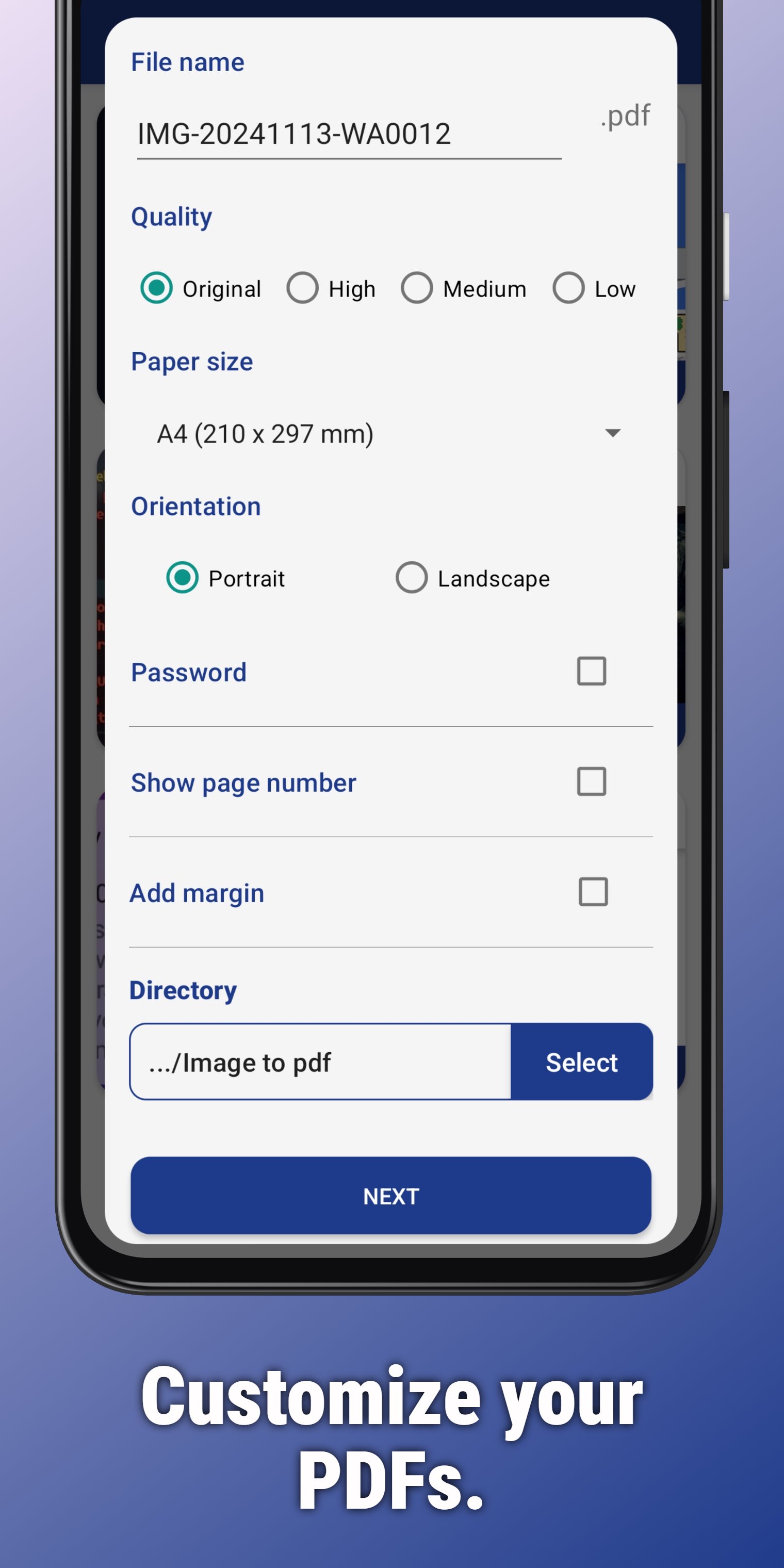
✔ Customizable PDF Output – Adjust page size, orientation, and layout.
✔ Organized File Management – Sort images into folders for easy access.
✔ Easy Sharing – Share PDFs effortlessly via email, messaging apps, or cloud storage.
✔ Image Resizing – Resize images before conversion without losing quality.
✔ Dedicated Output Directory – Save converted PDFs in a custom folder for better organization.
✔ Detailed Image Info – View file size, dimensions, and other essential details.
📌 Key Features:
🔹 Convert Images to PDF – Select one or multiple images, arrange them, and convert them into a professional PDF.
🔹 Batch Conversion – Convert multiple photos to PDF in one go. Ideal for handling large collections.
🔹 Customizable Paper Sizes – Choose from various formats like A4, A3, LETTER, and more.
🔹 Scan & Convert – Take a photo of any document and convert it to a high-quality PDF.
🔹 Resize Images – Adjust image size before conversion for perfect results.
🔹 Choose Output Directory – Save PDFs to a specific folder for easy access.
🔹 Print PDF Files – Print directly from the app with a single tap.
🔹 Sort & Organize Images – Keep your images structured before conversion.
🔹 View Image Details – Access file size, dimensions, and more.
🔹 Instant Sharing – Share your PDFs effortlessly with friends, colleagues, or cloud storage.
📖 How to Use Image to PDF Converter:
1️⃣ Open the app and tap Create. Choose an option:
• 📁 Gallery – Select images from your gallery.
• 📂 File Picker – Browse JPG, PNG, and other image files on your device.
• 📸 Document Scanner – Scan documents using your camera.
2️⃣ Edit & Rearrange – Organize your images before conversion.
3️⃣ Customize PDF settings – Set paper size, orientation, and other preferences.
4️⃣ Convert & Save – Choose an output directory and generate your PDF.
5️⃣ View, Share, or Print – Instantly share or print your newly created PDF.
🚀 Enhance Your Productivity with Image to PDF Converter!
Thank you for choosing Image to PDF Converter – the ultimate tool for effortless image-to-PDF conversion. Try it today and experience seamless document creation on your Android device!
Latest Version
2.3Uploaded by
Dawood Said
Requires Android
Android 7.0+
Category
Free Productivity AppContent Rating
Everyone
Security Report
Check Now
Report
Flag as inappropriateLast updated on Oct 29, 2025
Optimize app and fixed issues







APKPure - A multi-platform app store primarily focused on Android, providing extensive app-related content. Discover the app you want easier, faster, and safer, with quick and efficient downloads and installations.