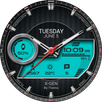
Presenting the JND0021 - A Beautiful Modern looking Hybrid Digital watch face for Wear OS from JacoNaudeDesign
The JND0021 is a modern looking hybrid digital watch face with large bold analog hands, a detailed back and time in digital format as well. Features include, 4 Shortcuts, 1 Customizable shortcut, Battery, Date, Steps & Heart rate. A dark similar always on display ensures great style and battery life.
INSTALLATION NOTES:
1 - Make sure the watch and phone is properly connected.
2 - Select target device from drop down in Play Store and select both Watch and Phone.
3. On your phone you can open up the Companion App and follow the instructions.
After a few minutes the watch face will transferred on watch : check the watch faces installed by the Wearable app on the phone.
Please NOTE:
If you stuck at payment loop, or if the face does not show on the watch, DO NOT WORRY, only one charge will be made even if you are asked to pay a second time. Wait 5 minutes or restart your watch and try again. You can also connect to Wi-Fi on your watch and search for JND0021 and install it from the watch, you will also not be charged again this way.
Please, any problems on this side are NOT caused by the developer, we are working with Samsung and Google to provide a more seamless experience and it will get better. Software is constantly being worked on and updated by all parties, please reach out if you have any problems.
IMPORTANT NOTE:
Please Make sure you have enabled all permissions from settings > applications. And also when prompted after installing face and when long pressing to customize complication.
INFORMATION ON HEART RATE:
The first time you use the face or put on the watch the heart rate is not measured automatically.
To measure heart rate, please make sure that the screen is turned on and that the watch is worn correctly on the wrist.
Tap the Heart rate shortcut. It will turn red to show you it is measuring and white when it is done. After the first manual measurement, the watch face will
automatically measure your heart rate every 10 minutes, or if you measure it manually.
For any assistance please reach out to us at support@jaconaudedesign.com
WATCH FEATURES:
Analog Time
Digital Time
12hr & 24Hr Support
Battery info
Steps & Heart rate
Date
4 Shortcuts
1 Customizable Shortcut
Similar dark AOD
Reach out to me on my other channels for ideas and promotions plus new releases.
WEB: www.jaconaudedesign.com
FACEBOOK: https://www.facebook.com/Jaconaudedesign-110829983803141/
INSTAGRAM: https://www.instagram.com/jaconaude2020/
Thank you and enjoy.
Latest Version
1.2Uploaded by
Acrylicnails Mia
Requires Android
Android 5.0+
Category
Free Personalization AppContent Rating
Everyone
Report
Flag as inappropriateLast updated on Apr 4, 2023
Minor bug fixes and improvements. Install or update to the newest version to check it out!



APKPure - A multi-platform app store primarily focused on Android, providing extensive app-related content. Discover the app you want easier, faster, and safer, with quick and efficient downloads and installations.