** THIS APP IS DESIGNED ONLY FOR USE WITH THE HARDWARE COMPONENT MIDI-SEQ-8 FROM PMFOUNDATIONS AND AN ANALOG SYNTHESIZER. OTHERWISE, THIS APP WON'T DO ANYTHING INTERESTING FOR YOU. **
You can get the hardware here: http://www.tindie.com/stores/pmfoundations/
• Play MIDI files from your phone/tablet on your analog synthesizer
• Convenience of a smartphone/tablet driven sequencer
• 8 MIDI channels supported which can drive 8 synth voices
• Play your own MIDI compositions on your synth from your phone
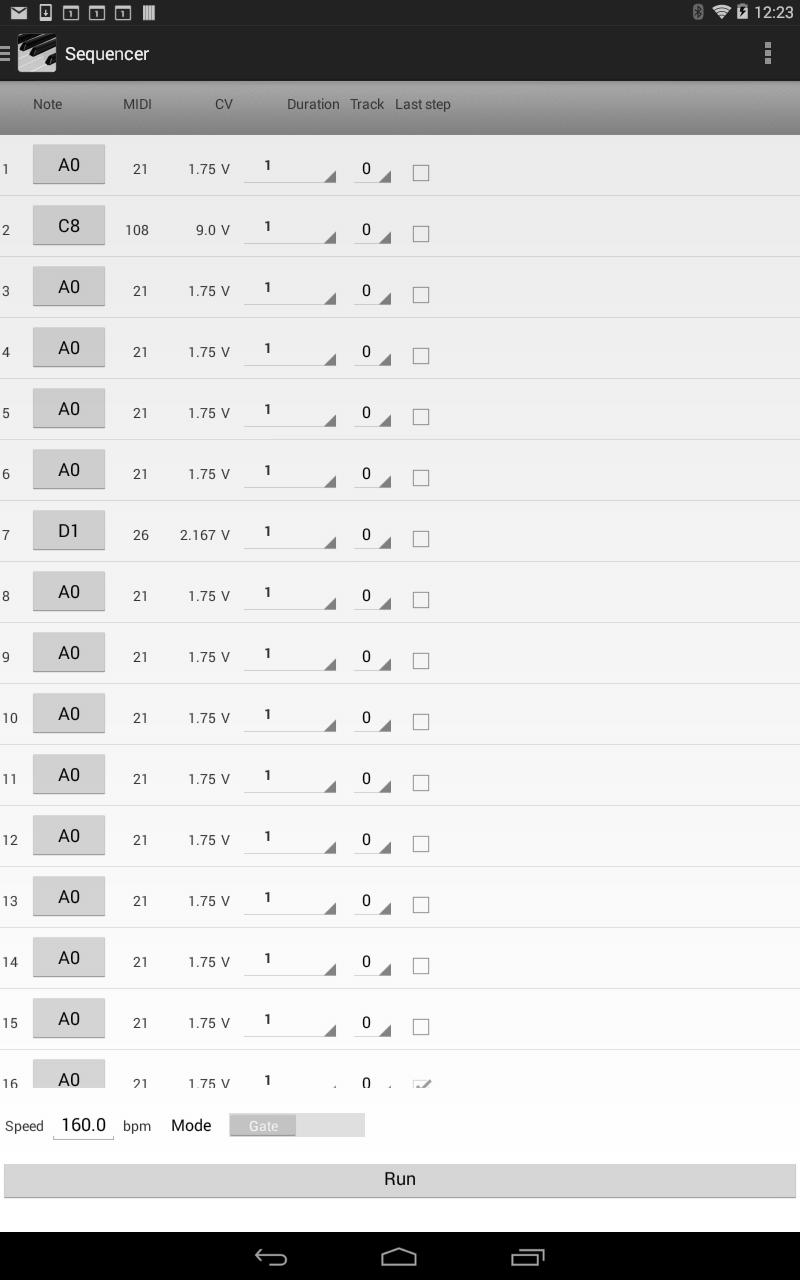
• Create and play CV sequences up to 16 steps on 8 channels
• Gate or Trigger mode
• Adjustable Clock in BPM
• Start / Stop /Rewind / Step
The MIDI Sequencer will directly play through your analog synthesizer over USB using the Midi-Seq-8 hardware. Treasure the convenience of a smartphone or tablet driven sequencer instead of a traditional and expensive hardware sequencer.
Our hardware module is Eurorack size and only 8HP wide leaving room in your rack for other modules.
If you are a composer, play your own MIDI sequences, backing tracks or songs on your synthesizer from your phone.
PLAYING MIDI FILES ON YOUR SYNTH
- To get midi files onto your device, you can connect the device to your PC with the USB cable and copy/paste files with the .MID extension into folders of your device which should appear as a window on the PC.
- Alternatively, you can use your device web browser to find and download files.
- Connect the CV and gate jacks of the MIDI-SEQ-8 hardware module to your synth VCOs and envelope shapers for as many channels as you are using.
- Open the Player screen on the app by swiping from the left to get the navigation menu.
- Open a previously copied or downloaded midi file of your choice by selecting Browse and browsing to the file location.
- You will need to experiment with various MIDI files to learn about the capabilities of the MIDI-SEQ-8.
USING THE SEQUENCER
- Connect the CV and gate jacks of the MIDI-SEQ-8 hardware module to your synth VCOs and envelope shapers for as many channels as you are using (up to 8).
- Open the Sequencer screen on the device by swiping from the left to get the navigation menu.
- Build up to a 16 step sequence by selecting notes/rests and durations.
- Select Run to transfer the sequence to the Player where you can use the player controls to play the sequence.
- Your creativity is required here!
The control section includes buttons for Start, Stop, Step and Rewind.
Versi Terbaru
1.1Diunggah oleh
Arda Kara
Perlu Android versi
Android 4.4+
Kategori
Gratis Musik & Audio APLIKASIRating konten
Everyone
Last updated on Mar 18, 2016
Versi ini berisi perbaikan bug kecil dan peningkatan umum. Update ke versi terbaru untuk mendapatkan pengalaman terbaik.



APKPure - Toko aplikasi multi-platform yang terutama berfokus pada Android, menyediakan konten terkait aplikasi yang luas. Temukan aplikasi yang Anda inginkan dengan lebih mudah, cepat, dan aman, dengan unduhan dan pemasangan yang cepat dan efisien.