
As we noticed some android settings are very difficult to find out in settings.
like ,
- Developer Options.
- Change SIM Network to 3G or 4G
- Manage overlay permission for installed applications.
- Device Testings.
so here we are with the easy solution, you need to just few taps to access those settings.
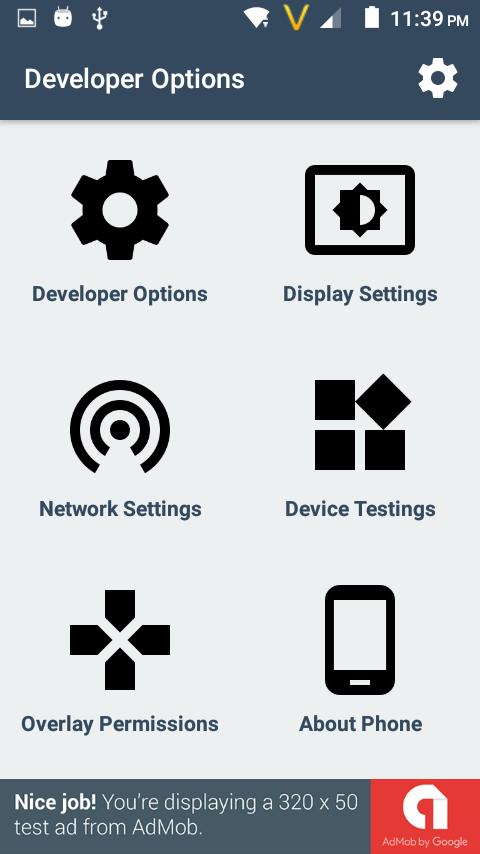
Functionalities :
1) Developer Options.
It will open up developer option activity , and you able to change large of settings like usb debugging , mock location app etc.
2) Display settings.
It will open display setting activity, on that activity you able to manage screen brightness , change wallpaper and many other settings.
3) Available Network
It will open the network activity, on that activity you able to manage your sim operator network.
4) Device Testing
It was a amazing feature, using that you able to test your device hardware also. also you able to switch your network to LTE Only.
( 4G device needed )
also have battery,wifi testing.
5) Manage Overlay Permission
That was seems to very difficult to find. using that activity you able to permit apps for overlay draw.
6) Device Details.
On that activity you easily find your android version as well device model number and much more things.
Versi Terbaru
1.6Diunggah oleh
جرح الزمن
Perlu Android versi
Android 4.0.3+
Kategori
Gratis Alat APLIKASIRating konten
Everyone
Last updated on Oct 1, 2017
Improved UI
Reduce Ads
Fix crash on some device




APKPure - Toko aplikasi multi-platform yang terutama berfokus pada Android, menyediakan konten terkait aplikasi yang luas. Temukan aplikasi yang Anda inginkan dengan lebih mudah, cepat, dan aman, dengan unduhan dan pemasangan yang cepat dan efisien.