
As we noticed some android settings are very difficult to find out in settings.
like ,
- Developer Options.
- Change SIM Network to 3G or 4G
- Manage overlay permission for installed applications.
- Device Testings.
so here we are with the easy solution, you need to just few taps to access those settings.
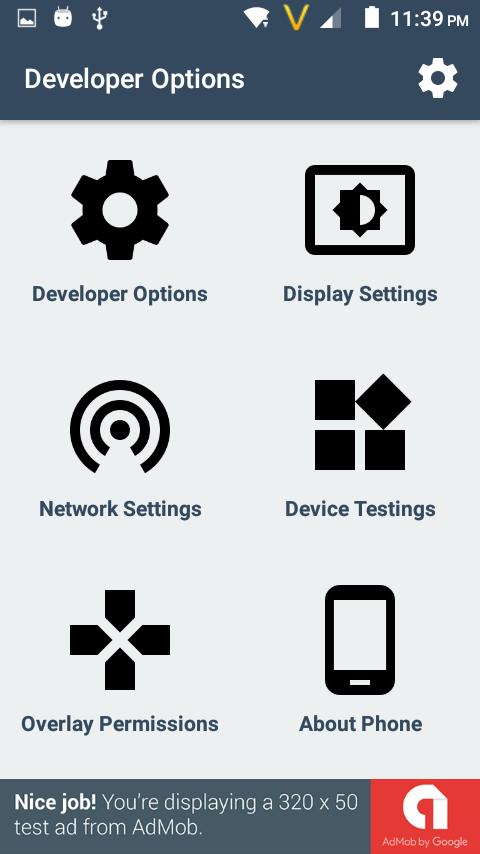
Functionalities :
1) Developer Options.
It will open up developer option activity , and you able to change large of settings like usb debugging , mock location app etc.
2) Display settings.
It will open display setting activity, on that activity you able to manage screen brightness , change wallpaper and many other settings.
3) Available Network
It will open the network activity, on that activity you able to manage your sim operator network.
4) Device Testing
It was a amazing feature, using that you able to test your device hardware also. also you able to switch your network to LTE Only.
( 4G device needed )
also have battery,wifi testing.
5) Manage Overlay Permission
That was seems to very difficult to find. using that activity you able to permit apps for overlay draw.
6) Device Details.
On that activity you easily find your android version as well device model number and much more things.
Última Versión
1.6Presentado por
جرح الزمن
Requisitos
Android 4.0.3+
Categoría
Gratis Herramientas APPClasificación de contenido
Everyone
Reportar
Marcar como inapropiadoLast updated on 01/10/2017
Improved UI
Reduce Ads
Fix crash on some device




APKPure - Una tienda de aplicaciones multiplataforma enfocada principalmente en Android, que proporciona un amplio contenido relacionado con aplicaciones. Descubre la aplicación que deseas de forma más fácil, rápida y segura, con descargas e instalaciones rápidas y eficientes.