Scan Date:May 5, 2026
Show More

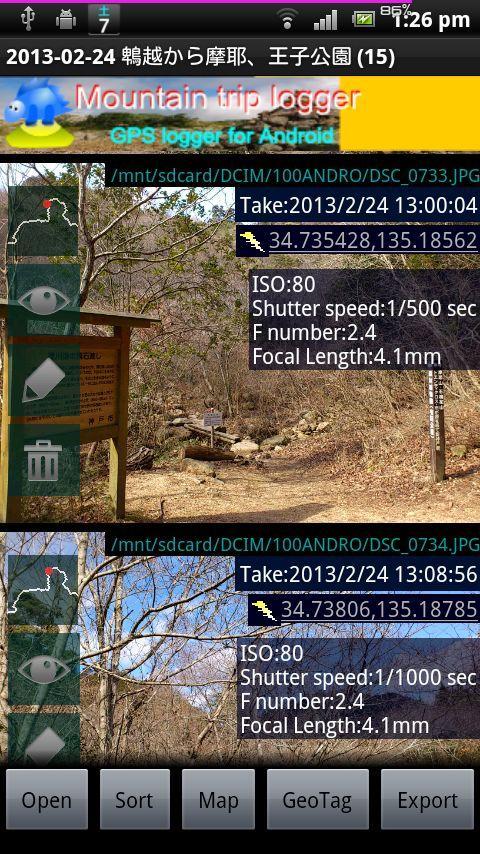
"GPX photo search" is Android app to search for photos taken in journey from the photo that is stored in the smart phone etc.
Since the search in the shooting time even if you do not have organize your photos, have been recorded, is a Hassle
To use later, is required track log data (GPX file) were recorded leg of a journey.
This will make a move if you record GPS logger app.
In GPX photo search, use time of the track log and time the picture was taken (Exif) to find the photo data
◆ How to use
Please send track log file (GPX) to GPX photo search.
[How to send]
・Place the SD card the GPX file, the file manager application to send
・In Mountain trip logger, press and hold the data you want to use the measurement results list screen, send in the form of share-GPX
Then, the search will begin the photo. View photos from the SD card to find a smartphone, that are found.
Display mode is switched to tap the screen, you can turn off the button and find more information and get out.
If a photo does not appear that there should be a photo but if, it may be funny to set the folder that you want to search for photos.
From Menu, setting, please try to change the settings of the folder you want to search.
▼ function (1) View photos every time
I think the camera is handy and they accumulated a lot of photos taken in various places.
And accumulate a lot, is very well to organize manually later.
However, it is all right if and when the track log data was taken, and GPX photo search.
Search even if they are not organized a photo, you can browse every time, you can output to a file.
▼ function (2) Set the Geotagging Photos
As how to use slightly more advanced, the photo (geo) has not been set location information, you can also set a geotag.
(Measures of location information leakage) in the camera settings you think in many cases have taken off and then recording the geotag.
Even in such a case, fine, if the data and track logs when taken, the GPX photo search.
You can set the photo geotagging to estimate the latitude and longitude of the position taken by matching the track log time and the picture was taken, does not have a geotag.
The advantage of setting up as geotagging, apps and services that support geotagging: In, you can put your photos on the map string.
Do not know when I look back later, be a more vivid memories.
▼ function (3) Output file
It is for people who have a PC primarily, can be output to a file and search photos.
-Format ZIP (image)
Outputs a file all images taken in the journey. Can be used to take a backup on your computer, such as
-Format GPX (waypoints)
Gpx file that outputs the way point to point and shoot. You can import a point in compatible software.
-Format KMZ (track log + points + reduced image)
Outputs the data points with a track log and photos of stroke, are listed on the map.
Latest Version
9.3Uploaded by
Sithu Aung
Requires Android
Android 4.4+
Category
Free Travel & Local AppContent Rating
Everyone
Security Report
Report
Flag as inappropriateLast updated on May 5, 2026
Version 9.3 (2026/5/3)
-Improved permission requirement.
Version 9.2 (2025/9/6)
-Adapted to Google Play's requirement which start at the second half of 2025 (targetAPI level36)
Version 9.1 (2025/3/23)
-Due to limitations in Android 13 and above, it is no longer possible to automatically search for photos linked to a trail from within the device.
We apologize for the inconvenience, but please select the photos that will be linked to your trail yourself.




APKPure - A multi-platform app store primarily focused on Android, providing extensive app-related content. Discover the app you want easier, faster, and safer, with quick and efficient downloads and installations.