Scan Date:Apr 9, 2026
Show More

Looking for a better alternative to Android default application drawer? Need a handy application manager? Have hundreds of applications that need to be organized and managed? Do you want to backup and restore third part application packages. Try out Glextor App Manager. It is one of the best and full-featured app manager and organizer for Android!
App organizer
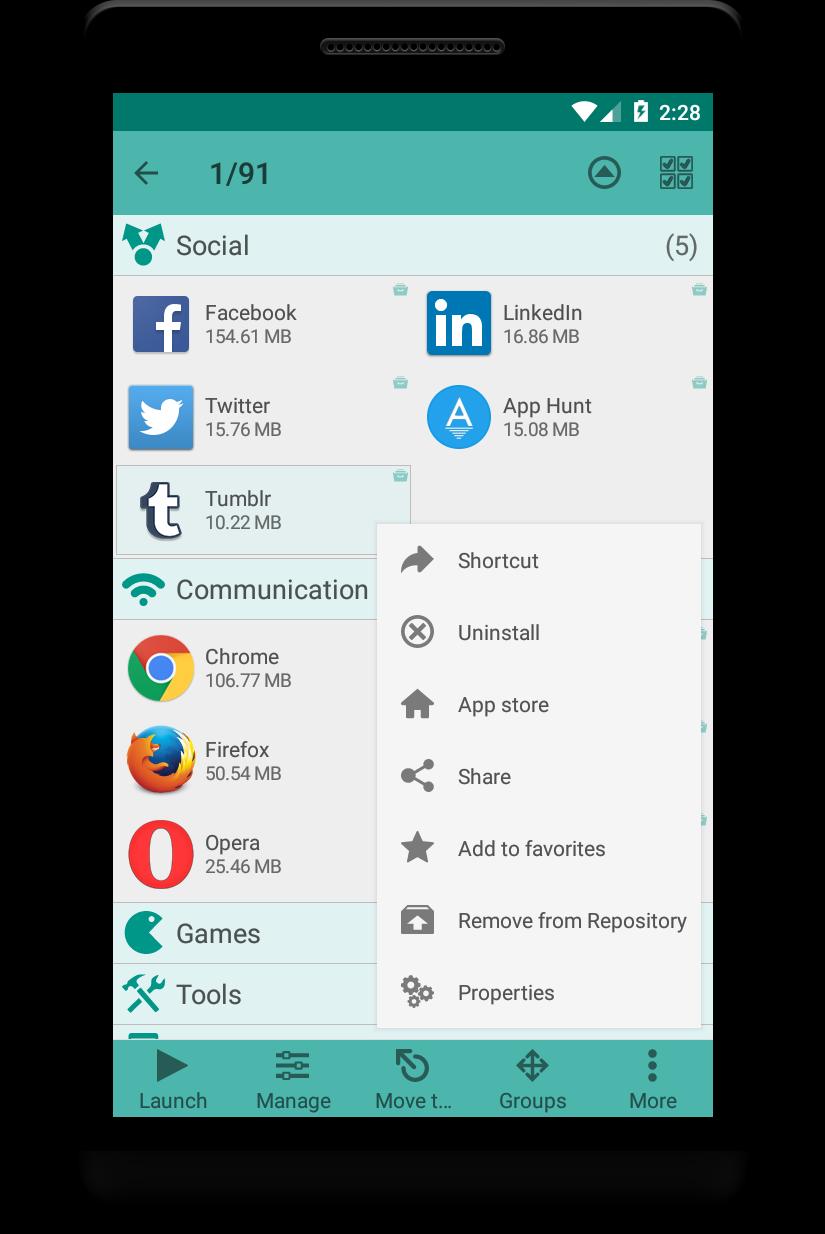
Organize your applications with auto-grouping to folders feature which is based on Google Play categories. Newly installed applications can be categorized automatically. If you want to get more personalized structure, create your own folders or just rename predefined ones. It is possible to assign each application to several groups at the same time according to your needs. Use system folders to get quick access to most used, last used, or last installed apps.
Group shortcuts & widgets
Now you don’t need to have dozens of shortcuts on your desktop. Use group desktop shortcuts and widgets to put your desktop in order.
Interface customization
Glextor AppManager has very flexible user interface. You can change the layout, icons, sorting, themes, customize menus and much more according to your taste and needs.
Application Repository with app market bookmarks and package backups (packages backup doesn't work well with all applications)
You have own Repository of applications where you can save applications as Market links or backup their packages (APK) with ability to install packages from backup later. To install application packages from backup you have to accept installation app packages permission for Glextor App Manager. Also you can share application packages using Android file sharing feature.
You can add applications to Repository from Google Play page (use Share there with Glextor App Manager as a target).
Favorites
Mark applications as favorites to find them easily. Your favorite apps are always placed at the beginning when app list is sorted by name. Use filters to see only favorites. Use system group Favorites to access all your favorite applications inside one folder.
Configuration export
There is no need to customize Glextor AppManager and organize installed apps on your new Android from the scratch. Just backup preferred configuration and restore it on a new system in one click.
...and more
• Manage installed apps
• Hide unused apps
• Share your favorite apps with your friends instantly (Facebook, Twitter, SMS, email, etc.)
• Use search and filters to find needed apps quickly
Note: This app uses Accessibility services.
If you are interested in helping us to translate this app to your native language, please let us know. Thank you in advance!
More screenshots and release notes: http://glextor.com/products/appmanager/
Also see features of the paid Full version:
★ Ability to add subfolders to top folders
★ Root tools (batch operations of install/uninstall apps faster and easier, uninstalling system applications)
★ Backup history (multiple backups per app)
★ Automatic update of app backups when new version is installed
★ Ability to hide as many apps as you need (Free version allows to hide up to 3 apps)
★ Ability to hide social panel from drawer
★ System groups customization (Free version allows to show up to 5 items only inside System folder)
★ Context menu customization
★ Transparency customization for desktop group popup
★ Automatic applying icon packs to all applications
★ Ability to reconfigure widgets
★ Absence of an advertisement block
Stay connected!
Google+: http://plus.google.com/+GlextorInc
Facebook: http://www.facebook.com/glextor
Twitter: http://twitter.com/GlextorInc
Email: glextor@gmail.com
Latest Version
6.0.5.661Uploaded by
Nilson Paulo Ribeiro
Requires Android
Android 6.0+
Category
Free Tools AppContent Rating
Everyone
Security Report
Report
Flag as inappropriateLast updated on Apr 14, 2026
- Added 15 new languages: Bengali, Bulgarian, Finnish, Filipino, Hebrew, Indonesian, Malay, Norwegian, Brazilian Portuguese, Romanian, Serbian, Swedish, Swahili, Thai, and Vietnamese
- Fixed the widget menu popup on new Samsung devices
- Fixed a few compatibility issues on new android versions
- Fixed empty group widget after unlock
- Fixed a few app crashes
- Fixed localization text for some languages






APKPure - A multi-platform app store primarily focused on Android, providing extensive app-related content. Discover the app you want easier, faster, and safer, with quick and efficient downloads and installations.