Package Name:com.emperor.garminenduro3guide
SHA-256:f3cdbae0b4a2feacdbdcf68624cd48ffddc6fda68a3ab7023a6f3d4ab1c4abf4
Show More
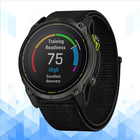
Garmin Enduro 3 Guide is a practical reference app for runners, endurance athletes, hikers, and outdoor users who want a clearer understanding of the Garmin Enduro 3 before setup, during daily use, and when solving common problems. This guide is designed to make the watch easier to understand, with clear information about pairing, maps, navigation, battery behavior, training features, smart functions, and everyday settings. Garmin positions Enduro 3 as an ultra-performance GPS smartwatch with solar charging, long battery life, lightweight design, and advanced navigation tools.
Inside the app, you can explore organized help for the topics users search for most. That includes Garmin Enduro 3 setup steps, Garmin Connect pairing basics, smart notification guidance, GPS and satellite settings, map downloads, music playback options, Garmin Pay support, health and wellness settings, flashlight access, and practical daily customization. The official owner’s manual shows sections for maps, navigation, music, safety and tracking, health settings, power manager settings, connectivity, and troubleshooting, which makes these areas especially useful for a guide app.
The guide also explains one of the biggest reasons people choose this watch: battery life. Garmin states that Enduro 3 can reach up to 36 days in smartwatch mode, up to 90 days with solar, up to 120 hours in GPS-only mode, and up to 320 hours with solar in GPS-only mode, depending on use conditions and enabled features. This app helps users understand what affects battery life in real use, including GPS mode, music, phone notifications, sensors, brightness, and alert settings. It also gives practical battery tips in a simple format for people who want longer endurance during training, racing, hiking, and outdoor travel.
Garmin Enduro 3 Guide highlights the navigation side of the watch as well. The official documentation shows support for TopoActive map downloads through Wi-Fi, map management, map layers, and advanced GNSS options including multi-band positioning and SatIQ technology, which dynamically balances accuracy and battery life. This guide helps users understand what those features mean in normal language.
Another strong section of this guide covers smart features that many users look up after purchase. Garmin’s documentation shows support for smart notifications, Garmin Pay, music playback with Bluetooth headphones, and an LED flashlight built into the watch controls. The app brings these topics together in one place so users can quickly learn how these features work and what to check when something does not behave as expected.
Troubleshooting is a major part of Garmin Enduro 3 Guide. Many users search for help when the watch is not pairing with the phone, notifications are missing, headphones do not connect, music cuts out, GPS is slow to lock, the heart rate reading seems inaccurate, or battery drain feels too fast. Garmin’s support and manual pages specifically address these common topics, and this app turns them into easier reference content for everyday users.
This application is for educational and informational purposes only. It does not connect to the watch, does not replace Garmin Connect or any official Garmin service, and does not provide official device control, account access, firmware tools, payment services, health advice, or emergency services. It is intended only to help users better understand setup, features, navigation, battery behavior, and common questions related to Garmin Enduro 3.
Disclaimer:
Garmin Enduro 3 Guide is not an official application and is not affiliated with, endorsed by, authorized by, or sponsored by Garmin or any related brand owner. All product names, trademarks, and brand references are the property of their respective owners. This app was created only as an independent educational guide for reference and learning purposes.
Latest Version
1.2.0Uploaded by
Manpreet Hansra
Requires Android
Android 7.0+
Category
Free Lifestyle AppContent Rating
Everyone
Security Report
Check Now
Report
Flag as inappropriateLast updated on Apr 4, 2026
Minor bug fixes and improvements. Install or update to the newest version to check it out!




APKPure - A multi-platform app store primarily focused on Android, providing extensive app-related content. Discover the app you want easier, faster, and safer, with quick and efficient downloads and installations.