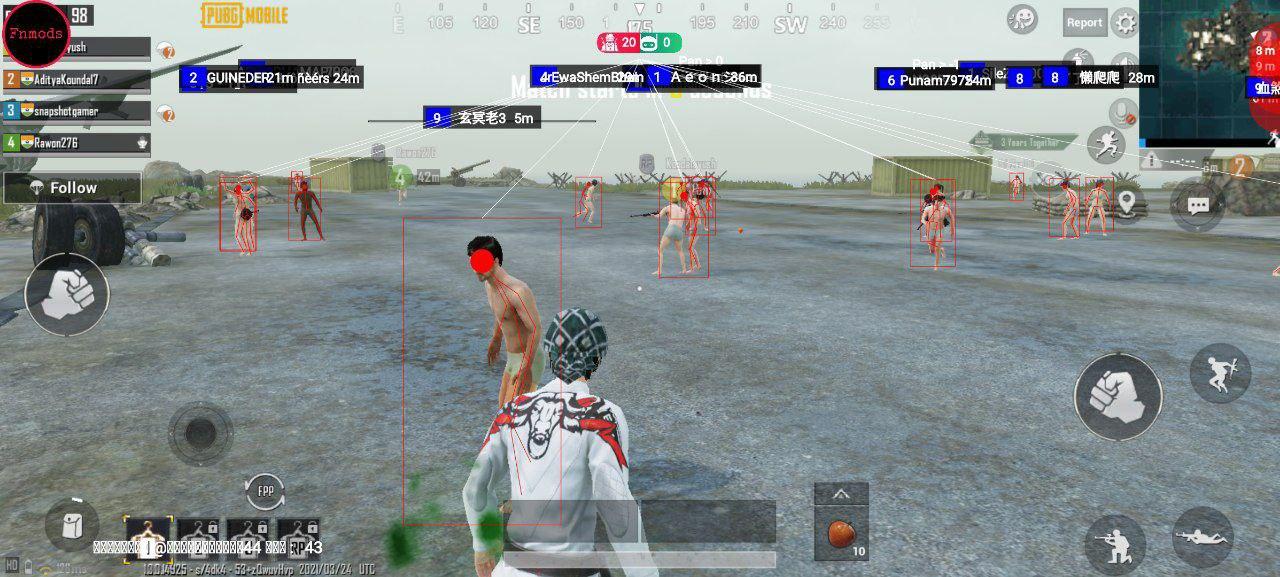
Fnmods Esp helps players who want clearer awareness during fast matches. When screens get busy, it offers setup guidance and community updates so you can stay informed. It is free to access and comes from the Fnmods community, which shares tips and notices across channels. As a fan project, it includes clear risk notices and non affiliation statements, while many users still look for the Fnmods Esp APK to learn how it works.
ESP awareness tools
Fnmods Esp provides on screen cues designed to improve in game awareness during action play. The display aims to make it easier to read busy scenes and react with more control. This helps you focus attention on movement without digging through extra menus.
Root and no root flexibility
To support different devices, Fnmods Esp can run on rooted phones and on non rooted phones. On non rooted setups, users typically place the app and the target game inside a virtual 32 bit environment to isolate changes. This approach helps many users test functions without modifying system files.
Fnmods Esp GG Tips companion
The Fnmods Esp GG Tips guide shares plain language instructions for common setup paths, including notes for no root scenarios. It is a fan made helper and is intended for entertainment and learning purposes. Use it to understand steps before adjusting anything on your device.
Free access and simple flow
Fnmods Esp is free to use, and the install flow is straightforward for most users. After the initial setup, you generally open the app, review the prompts, and proceed to your game. This simple pattern reduces the time needed to start a session.
Community updates and support
Fnmods maintains active channels on Telegram and YouTube that announce new builds, fixes, and usage tips. These spaces are helpful when a game update changes behavior or when a release targets a specific game version. Clear disclaimers remain in place, including use at your own risk and no affiliation with game publishers.
Fnmods Esp is not affiliated with any game publisher and is shared as a fan project. All usage is at your own risk, and content is offered as is. If you are unsure about any step, read the guidance in Fnmods Esp GG Tips first and check recent community posts for current notes.
Some releases may be linked to particular game updates, which means a build can work best with a specific version number. For example, a past release might have targeted a 1.4.0 update. When a game patches to a new version, review Telegram or YouTube announcements to confirm matching builds before you proceed.
On non rooted phones, a virtual 32 bit environment is often required to run both the game and the enhancer together. On rooted phones, the process can be more direct, yet it still depends on your device configuration. Plan a short test session first to confirm stability before extended play.
The basics are simple once you download Fnmods Esp and prepare your setup. The steps below outline a common process that many users follow on Android. Adjust details based on your device and the current community guidance.
Fnmods Esp focuses on practical awareness tools, flexible setup paths, and active community support. For the best experience, use the Fnmods Esp latest version that matches your game build and your device configuration. Download and set up only when you understand the risks and the fan made nature of this project.
Latest Version
2021Uploaded by
Mëãåd Ânä
Requires Android
Android 6.0+
Category
Free Tools AppContent Rating
Everyone
Report
Flag as inappropriateLast updated on Jul 20, 2021
-Add protection ESP Last Update
-New System Esp Fixed Some Bugs
-improve Performance and Experience




APKPure - A multi-platform app store primarily focused on Android, providing extensive app-related content. Discover the app you want easier, faster, and safer, with quick and efficient downloads and installations.