Scan Date:Aug 19, 2024
Show More

This application is for users who have trouble using buttons. It Replaces a failed and broken buttons or navigation bar. you can place Nav bar anywhere on screen hence we call it float keys
Do you want your back button to open an app? or toggle flash light with Recent button? Split screen with home button? your Phone Power button has developed a fault and you cannot press Power button anymore? Or your phone built-in navigation bar is broken and you cannot use back? Then this app is the right app for you.
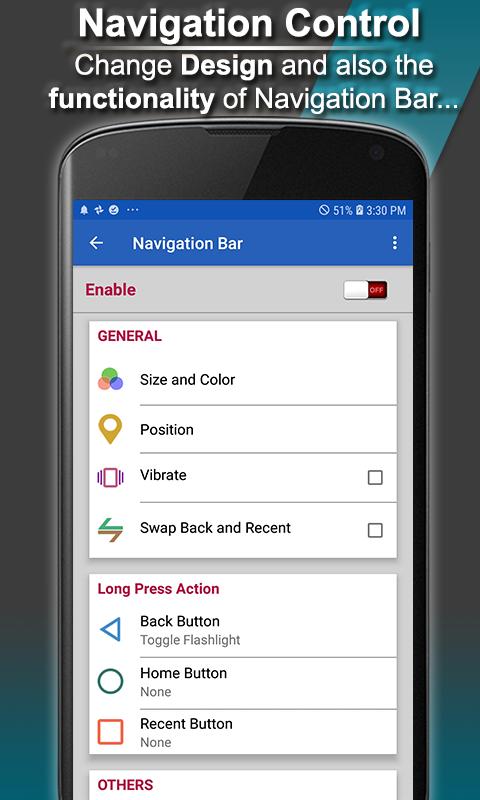
Navigation Control bar is a nice little navigation bar which you can place anywhere on screen for easy access . it also enables you to customize your navigation bar by selecting and applying different themes on navigation bar. Navigation Control bar is designed to be as simple as possible .
Navigation control bar offers the back button , home button and recent button along with an added button to move the navigation bar to the area of screen where you want it. You can also customize the functionality of these buttons with longpress options.
Buttons added are:
- Back button
- Home button
- Recent Button
Actions to be performed can be:
- Back functionality
- Home function
- Recent function
- toggle Flashlight with any button
- Launch an app
- Split screen
- Power dialog
- Quick settings
- Notifications.
Feature
1 - Simple app to offer simple Navigation control bar for easy access
2 - Back button functionality
3 - Home button functionality
4 - Recent button functionality
5 - Navigation bar is always displayed on top of other apps
6 - Move the navigation control to anywhere on screen
7 - Customizable Navigation bar. Apply different themes and different icon set
8 - tap On/Off button to easily on and off the custom navigation control bar
9 - Launch a different task on long press of Back, Home and Recent button
10- Assign custom tasks to buttons including app launch, toggle flashlight, Power dialog
Split screen, Notifications, Quick settings.
Important Notice:
This App needs uses Accessibility Service or BIND_ACCESSIBILITY_SERVICE . It uses Accessibility Service to perform Back, Home, Recent Apps Event. This app does not store your numbers or other personal Information.
Note:- In order for this app to work you should tap On Accessibility Services for this app.
1:- Go to Accessibility Services and tap on Navigation Bar.
2:- Give Accessibility Permissions to Navigation Bar.
Latest Version
4.5Uploaded by
Thales Augusto
Requires Android
Android 5.0+
Category
Free Tools AppContent Rating
Everyone
Security Report
Report
Flag as inappropriateLast updated on Jul 22, 2024
Minor bug fixes and improvements. Install or update to the newest version to check it out!




APKPure - A multi-platform app store primarily focused on Android, providing extensive app-related content. Discover the app you want easier, faster, and safer, with quick and efficient downloads and installations.