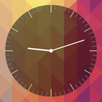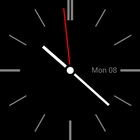
Minimal-style clock as your device wallpaper or widget
Note! Check out Minimal Clock 2 for more customization options!
Instructions:
1) To use as a wallpaper, select Settings -> Display -> Live Wallpapers -> Minimal Clock
2) To use as a widget, select Apps -> Widgets -> Minimal Clock
3) To use as a lock screen widget, swipe left on your lock screen and select "+" -> Minimal Clock
آخرین نسخه
1.0.1بارگذاری شده توسط
Olando Kirlew
نیاز به اندروید
Android 4.0.3+
دسته بندی
رایگان برنامه شخصی سازیرتبهبندی محتوا
Everyone
گزارش
گزارش محتوای نامناسبLast updated on 13/08/2015
- updated app icons



APKPure - یک فروشگاه برنامه چند پلتفرمی که در درجه اول روی Android متمرکز شده و محتوای گسترده مربوط به برنامه را ارائه می دهد. برنامه مورد نظر خود را آسانتر ، سریعتر و ایمن تر با بارگیری و نصب سریع و کارآمد کشف کنید.