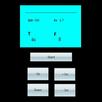
Place levelly the table's top to be partial to move an angle data for the accurate diagraph table's top, have to correct and tiny adjust the function
Use sketch and data double to suggest, can even is clear at a glance the current angle status
Set the method:
While opening for the first time please show to choose SET to set and correct your cellular phone, the method is as follows
A. Place the cellular phone level to the flat surface of absolute level up, need the left top corn X, the Y data presses the SET knob of SETP1 after stopping the fluctuation
B. Straighten a cellular phone, place the cellular phone erection 90 degrees of absolute positions, need the left top corn X, the Y data presses the SET knob of SETP2 after stopping the fluctuation
C. The side lets go the machine and place the cellular phone erection 90 degrees of absolute positions, need the left top corn X, the Y data presses the SET knob of SETP3 after stopping the fluctuation
D. Keep the cellular phone sets the offset number for the B or the C status to approach 90(look like then)
E. After setting the completion select the Back system will store a data, use not to need to set a cellular phone again after
Operation method:
A. Measure the table's top level method, open the software to place a cellular phone table's top top will show the X, the Y stalk is partial to move the angle, above the red line represents a just inclined direction in the middle of square's frame diagram
B. Measure wall or perpendicular method, perpendicular or lay down horizontally a cellular phone, the lines will keep forever and ground 90 degrees of perpendicular statuses and will show the X, Y stalk data
Latest Version
1.0Uploaded by
Anas Hs
Requires Android
Android 2.3.4+
Category
Free Tools AppContent Rating
Everyone
Report
Flag as inappropriateLast updated on Nov 21, 2015
Minor bug fixes and improvements. Install or update to the newest version to check it out!




APKPure - A multi-platform app store primarily focused on Android, providing extensive app-related content. Discover the app you want easier, faster, and safer, with quick and efficient downloads and installations.