Diff Browser keeps everyday surfing quick, quiet, and under your control. It trims page weight to help sites load faster, reduces distractions while you read, and provides straightforward privacy options, so you decide what stays on your device. The interface stays simple; you can switch views, adjust data use, and translate pages without digging through complex menus. You can get the Diff Browser APK and keep it updated on APKPure to maintain smooth performance. Moreover, it is designed for Android and works well on both newer and older phones.
Fast and lightweight performance
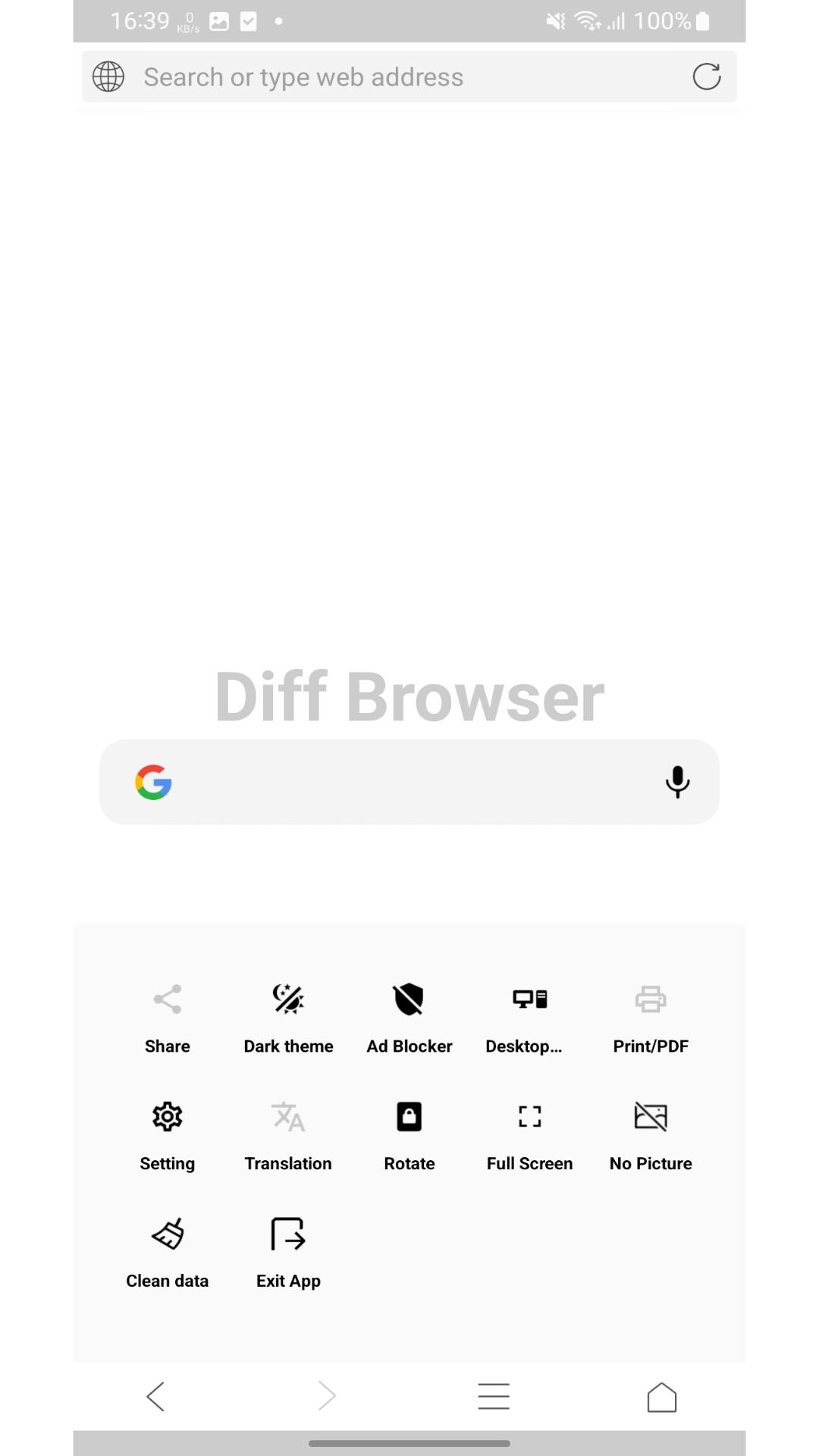
Diff Browser focuses on speed, so pages open quickly even on modest hardware. It keeps memory use lean, which helps tabs feel responsive. Therefore, you can scroll and switch sites without lag.
Ad blocking to reduce clutter
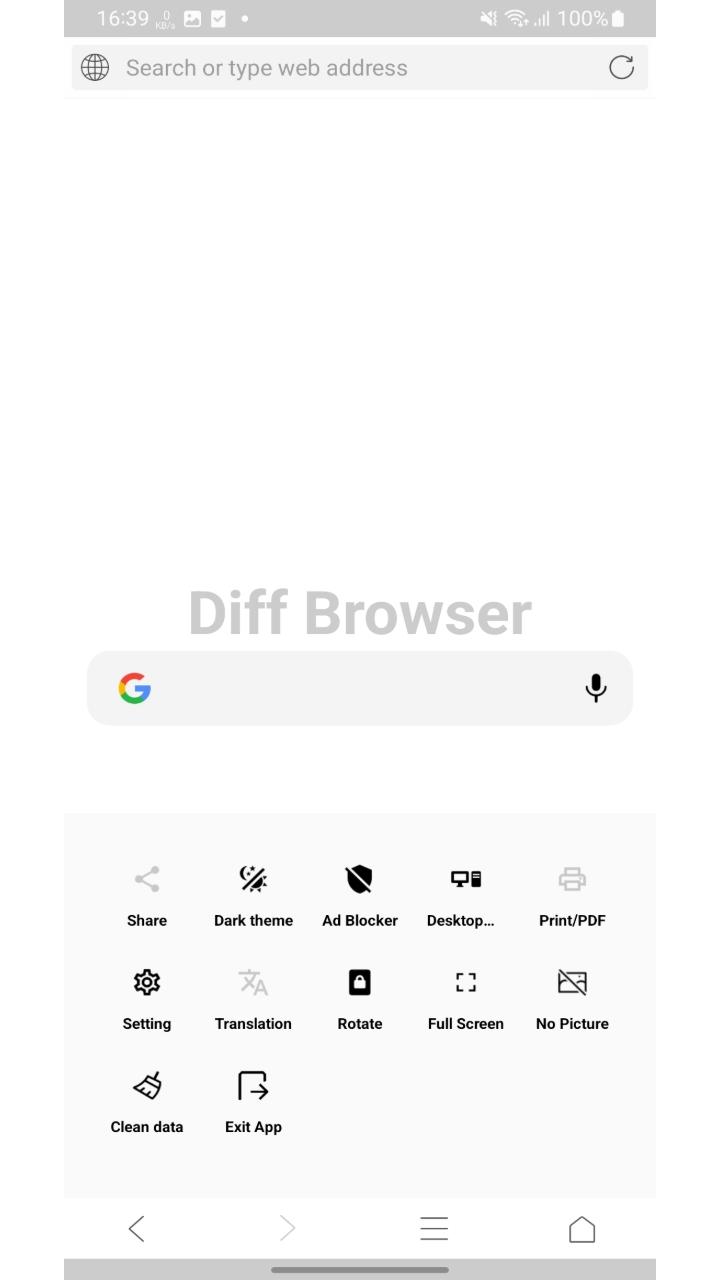
The browser removes intrusive ads to cut distractions and help pages render faster. This saves bandwidth on mobile data. Moreover, you gain a cleaner reading view of news, blogs, and forums.
Simple privacy controls
With one tap, you can clear browsing data such as history and cache. You decide what to keep and what to delete. In addition, Diff Browser keeps privacy options easy to find so you stay in control.
Data saver for slow networks
In Diff Browser, you can block images on demand to lower data usage and speed up loads on weak connections. This helps when traveling or using metered plans. After enabling it, pages focus on text first.
Flexible viewing and reading comfort
Switch to the desktop site when a page needs the full layout, or use full screen to maximize space. Orientation controls make landscape or portrait reading comfortable. Next, you can quickly return to your default view.
Personalization and page translation
Theme settings let you adjust the look so browsing feels comfortable at any time of day. Integrated page translation helps you read sites in your language. Finally, Diff Browser keeps these tools close to the main menu.
If you want to use Diff Browser on a computer, you can run it through an Android emulator. Install an emulator on PC, then download Diff Browser APK from APKPure. After installation, open the emulator and drag the downloaded file into the emulator window to start the install.
Sometimes you may prefer an earlier release for compatibility. You can find Diff Browser old versions on the APKPure app page under the Old Versions section, then select and download the build you need. After choosing, follow the same installation steps as the current release.
At this time, Diff Browser is available for Android devices. There is no confirmed iOS build from the developer. If availability changes, we will update the Diff Browser APK page with the latest details.
This quick guide shows how to set up Diff Browser for everyday use. You will learn how to adjust privacy, data saving, and viewing options so your browsing matches your needs.
Open Diff Browser after installation, then set it as the default if you want links to open in it.
Go to the menu and review Privacy settings, then use Clear data to remove history and cache when needed.
After that, enable the ad blocker in settings so pages load with fewer distractions and use less data.
Open a site on a slow connection, then toggle Block images to load text first and reduce bandwidth use.
Then switch to the Desktop site or Full screen from the menu when a page layout requires a wider view, and use Translate to read content in your language.
Diff Browser keeps browsing fast, private, and efficient with straightforward controls. Download Diff Browser APK latest version from APKPure to download Diff Browser safely and keep it up to date. Install it in a few taps and browse with fewer distractions.
Can I run Diff Browser on PC or Mac?
Yes, you can run Diff Browser on a computer using an Android emulator such as LDPlayer or MEmu. Install the emulator, download Diff Browser APK from APKPure, then drag the file into the emulator to install. After that, open Diff Browser from the emulator home screen.
Does Diff Browser have a secret mode for private browsing?
Diff Browser focuses on privacy with quick Clear data controls for history and cache, although it does not advertise a separate secret mode. You can regularly clear your data and adjust privacy settings to reduce traces from your sessions.
Is Diff Browser the same product as Diffchecker?
No, Diff Browser is an Android web browser focused on speed and privacy, while Diffchecker is a file and text comparison tool. Therefore, these are different products with different purposes.
Latest Version
V3.0.0Uploaded by
Antonio Bocchino
Requires Android
Android 7.0+
Category
Free Tools AppContent Rating
Everyone
Report
Flag as inappropriateLast updated on Dec 20, 2024
This release includes minor bug fixes and general improvements. Update to the latest version for the best experience.


APKPure - A multi-platform app store primarily focused on Android, providing extensive app-related content. Discover the app you want easier, faster, and safer, with quick and efficient downloads and installations.