Scan Date:Apr 17, 2026
Show More
Diamond Painting Pattern Creator
Comes with 4 sample diamond patterns. Download is free. To activate is $2.99.
Highly recommended to use a tablet because of Diamond Painting pattern size.
Create your own Diamond Painting patterns.
To create Diamond Painting patterns, select Create a Diamond Paint Pattern button.
The Diamond Painting Pattern Editor will appear. Fill in the squares with DMS diamond colors.
You can even add your own colors if you want.
To get started - Use the pencil to fill in squares to your pattern. Use the Eraser to clear filled squares from your diamond painting pattern.
You also can select from over 80 stamps and borders to apply to your diamond painting pattern.
Icons from left to right in the icon bar are:
DMC Diamond Color icon - use to select the Diamond Drill color you want to use
Save icon - use to save your pattern
Pencil icon - use to fill in squares on your diamond painting pattern
Eraser icon - use to erase filled squares from your diamond painting pattern
Stamps icon - selectable little stamps (little diamond pattern designs) to add to your diamond painting pattern
Borders icon - selectable borders to add to your pattern. Borders automatically wrap around your diamond painting pattern.
Dropper icon - lets you extract a color from your pattern and add more of that color to your diamond painting pattern
Bucket icon - use to fill selected area with the current selected color
Bucket+ icon - used to replace a color with the currently selected color
Undo icon - undo each last change you made to your diamond painting pattern
Redo icon - redo each changes you undid
Cut icon - remove select area of your diamond painting pattern
Copy icon - copy selected area of your diamond painting pattern
Paste icon - paste copied area to your pattern
Rotate - rotated selection of pattern or whole pattern
Flip right/left - flip selection of your pattern
Flip top/bottom - flip selection of your pattern
Resize icon - change the number of rows/cols of your diamond painting pattern
Zoom in icon - magnify your diamond painting pattern
Zoom out icon - minify your diamond painting pattern
Zoom 1:1 - zoom pattern to Diamond drill actual size.
Symbols icon - display a unique symbol on each color to indicate it's color value
Picture icon - select a picture from your device and convert to a pattern
Social media icon - use social media to share your pattern (email, text etc.) When you share your pattern, you will have options to create a picture of your pattern and instructions using actual diamond drill sizes.
Resize bars - resize bars are display at the bottom right corner of your pattern. Drag them to resize your diamond painting pattern
Option settings - change the grid color, change diamond shapes (squares or circle), select not to display the row/column counter.
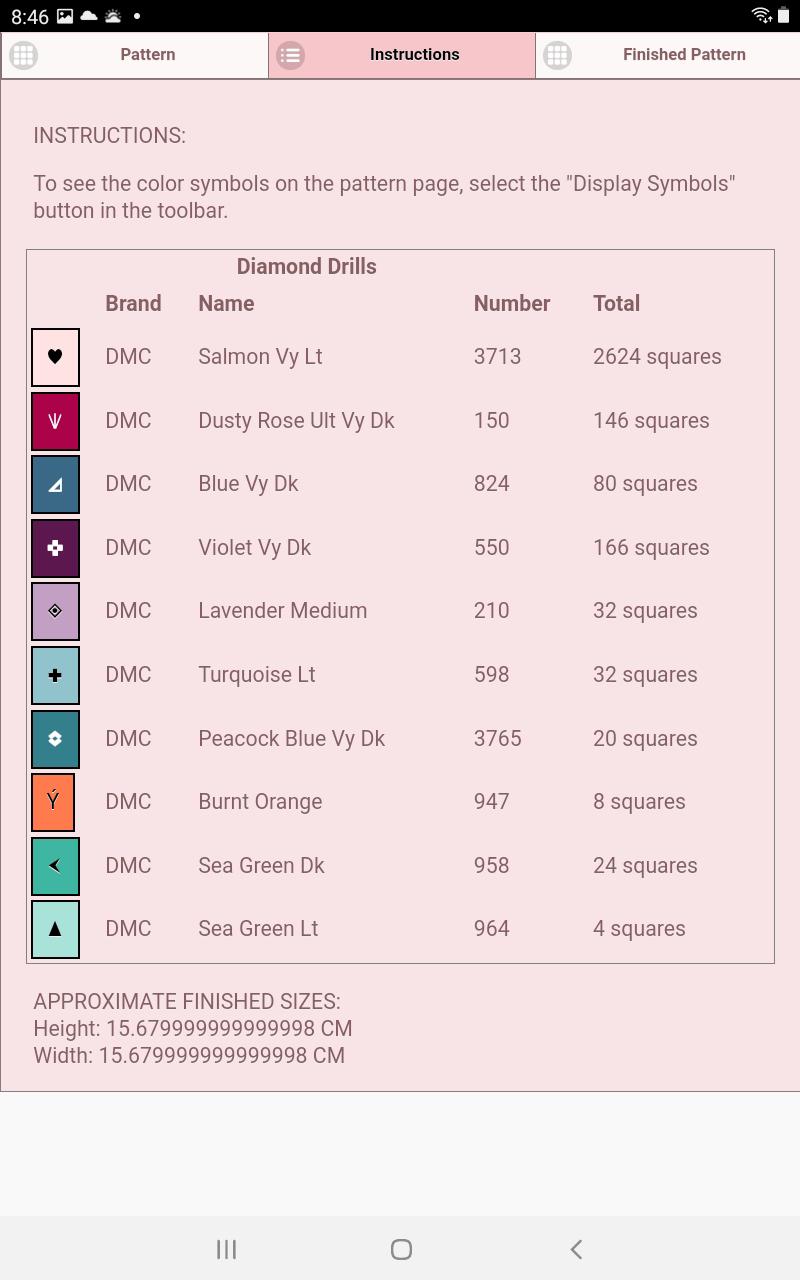
Instruction page - displays the DMC Diamond colors used and finished size
Finished Product page - displays what your pattern looks like after completed.
Latest Version
4.2.5Uploaded by
Farhan
Requires Android
Android 5.1+
Category
Free Art & Design AppContent Rating
Everyone
Security Report
Report
Flag as inappropriateLast updated on Apr 17, 2026
Create your own Diamond Painting patterns using Diamond Painting Pattern Creator.
Over 100 borders and stamps to add to your pattern.
Print your pattern and instructions.
No Ads ever.
One Time Only Activation Fee is $2.99





APKPure - A multi-platform app store primarily focused on Android, providing extensive app-related content. Discover the app you want easier, faster, and safer, with quick and efficient downloads and installations.