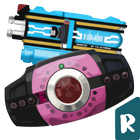

Decade Diend Neo Belt Systems gives fans a simple way to experience belt interactions on a phone during quick sessions or longer play. It suits users who enjoy tapping the driver and cycling through cards without complex menus, and it stays focused on audio and timing for steady sessions. As a Kamen Rider Decade simulator, it keeps controls clear so newcomers can try it easily while experienced users explore deeper interactions. To install, find Decade Diend Neo Belt Systems APK and follow your usual Android setup process.
Decade Diend Neo Belt Systems focuses on accurate belt audio cues that match the series style. You tap the driver and hear clean triggers, and the app keeps the response timing consistent. This helps you follow card actions without guesswork and keeps the experience steady during repeated plays.
270 plus cards for interactive playYou can browse and use more than 270 cards across the simulation. Cards insert, trigger sounds, and can be swapped to try different sequences. With this large selection, you explore many interactions at your own pace while staying inside a simple flow.
Quick driver and card selection flowThe main screen helps you pick a driver and start play with a few taps. Navigation stays straightforward, so you can move from driver choice to card actions without delays. As a result, sessions begin fast and you get into card play smoothly.
Free and ad supported experienceThe app is free to use, and ads may appear during use. Decade Diend Neo Belt Systems keeps core play accessible without purchases, and users can expect ad breaks at times. If an ad interrupts audio, returning to the main screen and replaying sounds can help resume normal behavior.
Optional PC emulator supportIf you prefer large screen controls, you can run the app on common Android emulators for PC such as LDPlayer or GameLoop. Decade Diend Neo Belt Systems works with typical emulator taps and audio output, so your controls feel familiar. Specific setup follows each emulator guide, and performance depends on your computer.
Some users report audio cutting out after an ad, which can make belt sounds disappear. If this happens, return to the main screen and try triggering the sound again, or fully close and relaunch the app to reload audio. Checking your device media volume and ensuring silent mode is off can also help restore playback.
Tapping the driver on the main screen can occasionally result in a black screen for some devices. In that case, wait for any ad to finish, tap back to the previous screen, and reselect the driver. If the issue persists, close the app from recent tasks and reopen it; reinstalling may not fix this specific behavior based on user reports.
A few cards are currently unavailable, and players have requested additions such as Final Form Ride Den-O DenLiner and Kamen Ride Gackt, along with expanded Diendriver compatibility. Support for other devices like OG Deca, Diendriver, K-Touch 21 D, and TSG Reflecloud has also been requested. Availability can change over time, so content may expand in future versions from RAINDAY! STUDIO.
Using the app on a phone is straightforward. The Decade Diend Neo Belt Systems latest version keeps card flow simple, so you can start quickly and repeat sessions without extra setup. The steps below outline a typical play cycle.
Decade Diend Neo Belt Systems delivers focused belt simulation with a wide set of card interactions for Android sessions. For quick access on a phone, download Decade Diend Neo Belt Systems and explore different card sequences at your own pace.
Latest Version
1.3Uploaded by
Phoe Thar
Requires Android
Android 5.1+
Category
Free Simulation GameContent Rating
Everyone
Report
Flag as inappropriateLast updated on Feb 27, 2024
- Neo Decade Driver
- Neo Diend Driver
- 270+ Rider Card
- Kamen rider
- Kaijin Ride
- Final Form Rider
- Attack rider
- Form rider
- Final Attack Rider
- Extra Card Kamen rider
- Second Kamen rider
- Showa Kamen rider
- Special Kamen rider
- Final Kamen Attack Form rider




APKPure - A multi-platform app store primarily focused on Android, providing extensive app-related content. Discover the app you want easier, faster, and safer, with quick and efficient downloads and installations.











