
Creating different complex passwords for all the sites one uses has always been an issue.
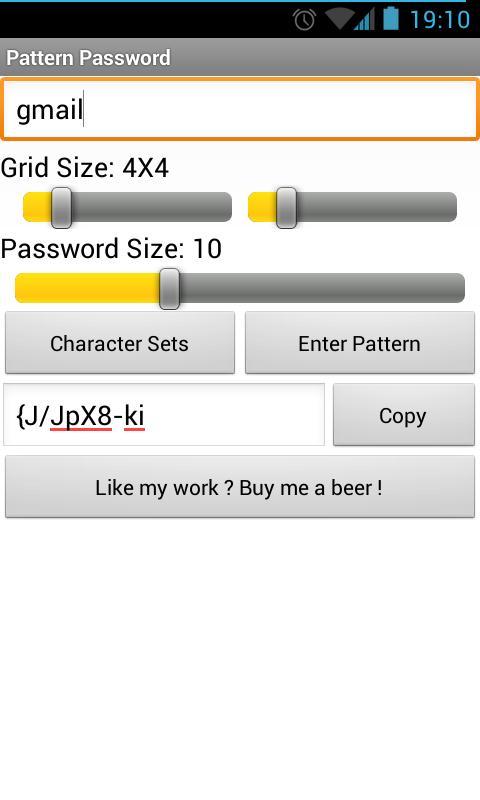
Pattern password transforms a pattern of your choice into a secure password for each of the sites you use.
For your ease of mind this extension is completely isolated: does not communicate with any server and does not store anything on your device.
Usage:
1. (optional) Enter the name of your target site (like "gmail")
2. (optional) Change the size of the pattern grid and output password size.
3. (optional) If you want your password not to include special characters, click "Character Sets" and uncheck the group you want excluded.
4. Press "Enter Pattern" then enter your pattern by touch and drag across the hexagon board, then confirm it.
5. Your password has been generated. Use "Copy" to put it in your clipboard.
6. (optional but appreciated) buy me a beer.
Aktuelle Version
1.3Von hochgeladen
Feysel Ronaldo
Erforderliche Android-Version
Android 2.1+
Kategorie
Gratis Effizienz APPAltersfreigabe
Unrated · Warning – content has not yet been rated. Unrated apps may potentially contain content appropriate for mature audiences only.
Last updated on Aug 11, 2015
1.3 Added links to the PC versions.
1.1 Added better support for tablets.
1.0 First Version of the app



APKPure – Ein plattformübergreifender App-Store mit Fokus auf Android, der eine Vielzahl an Apps und relevanten Inhalten bietet. Entdecken Ihre gewünschte App, laden und installieren Sie schneller, sicherer und effizienter.