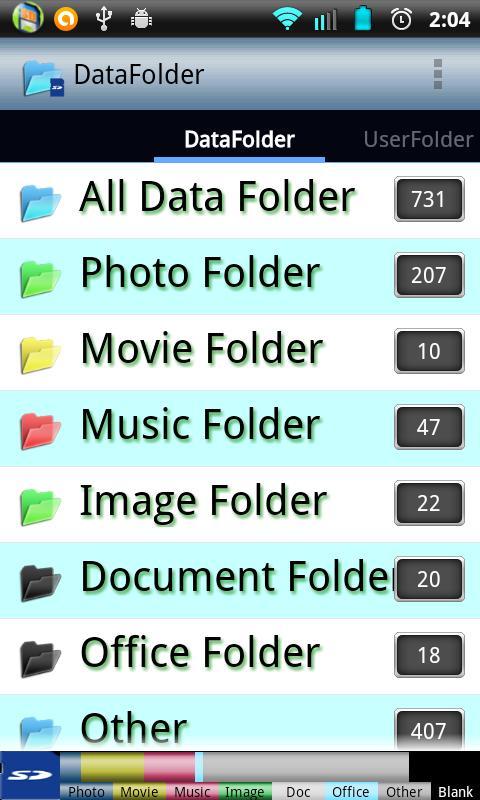
DataFolder displays divided SD data according to a folder.
[Folder]
①All the data
②Photo folder · (jpg...)
③Movie Folder · (mp4...)
④Music folder · (mp3...)
⑤Image Folder · (gif...)
⑥Document folder · (txt...)
⑦Office folder · (doc...)
[Data List]
The data show the following two lists.
①List view
②Thumbnails (photo, image)
[Sort]
You can sort the data in each folder.
①Date (New)
②Date (Old)
③Name (Ascending)
④Name (descending)
[Detail Function]
・Collect all the files on the SD card for the first time
・The folder does not change actually
・If the file is added to the SD card, please press the update button.
・It also displays the SD card capacity at the bottom of top page.
When you tap the icon that is like the SD card, you will see the details of the capacity of the SD card.
Latest Version
4.4.10Uploaded by
Beth Bryant
Requires Android
Android 2.2+
Category
Free Productivity AppContent Rating
Everyone
Report
Flag as inappropriateLast updated on Jul 15, 2015
2014/05/24
1.Fix to display Text on the button when you are selecting.
2.bug fix.



APKPure - A multi-platform app store primarily focused on Android, providing extensive app-related content. Discover the app you want easier, faster, and safer, with quick and efficient downloads and installations.