Package Name:com.blockwake.app
SHA-256:0e5d848b42f44ea189adf41444a6400a50ee53c83937650940aa0a3f19db311e
Show More
Wake up on time with BlockWake, a reliable alarm clock for heavy sleepers, students, shift workers, snooze users, and people with ADHD who benefit from a clear, structured morning routine.
Create multiple alarms as one organized sequence, use interactive wake-up challenges, customize how each alarm stops, and plan sleep and wake times with the Circadian Rhythm Calculator. The free version has no ads, collects no personal data, and requires no account.
■ MULTIPLE ALARMS, ONE ORGANIZED ROUTINE
Stop managing a cluttered list of disconnected alarms. BlockWake lets you create an entire alarm sequence in seconds:
- Choose the first alarm time
- Select how many alarms you need
- Set the minutes between alarms
- Manage the complete sequence as one alarm set
- Edit individual alarms when needed
- Create separate standalone alarms
■ WAKE-UP CHALLENGES
If one tap is too easy, require an interactive wake-up challenge before dismissal:
- Math: solve a problem
- Maze: navigate to the exit
- Tic-Tac-Toe: complete a quick game
- Hold: press until the progress bar finishes
Choose a challenge and difficulty for workdays, study days, early shifts, or mornings when you need extra motivation to leave bed.
■ CUSTOMIZE EVERY ALARM
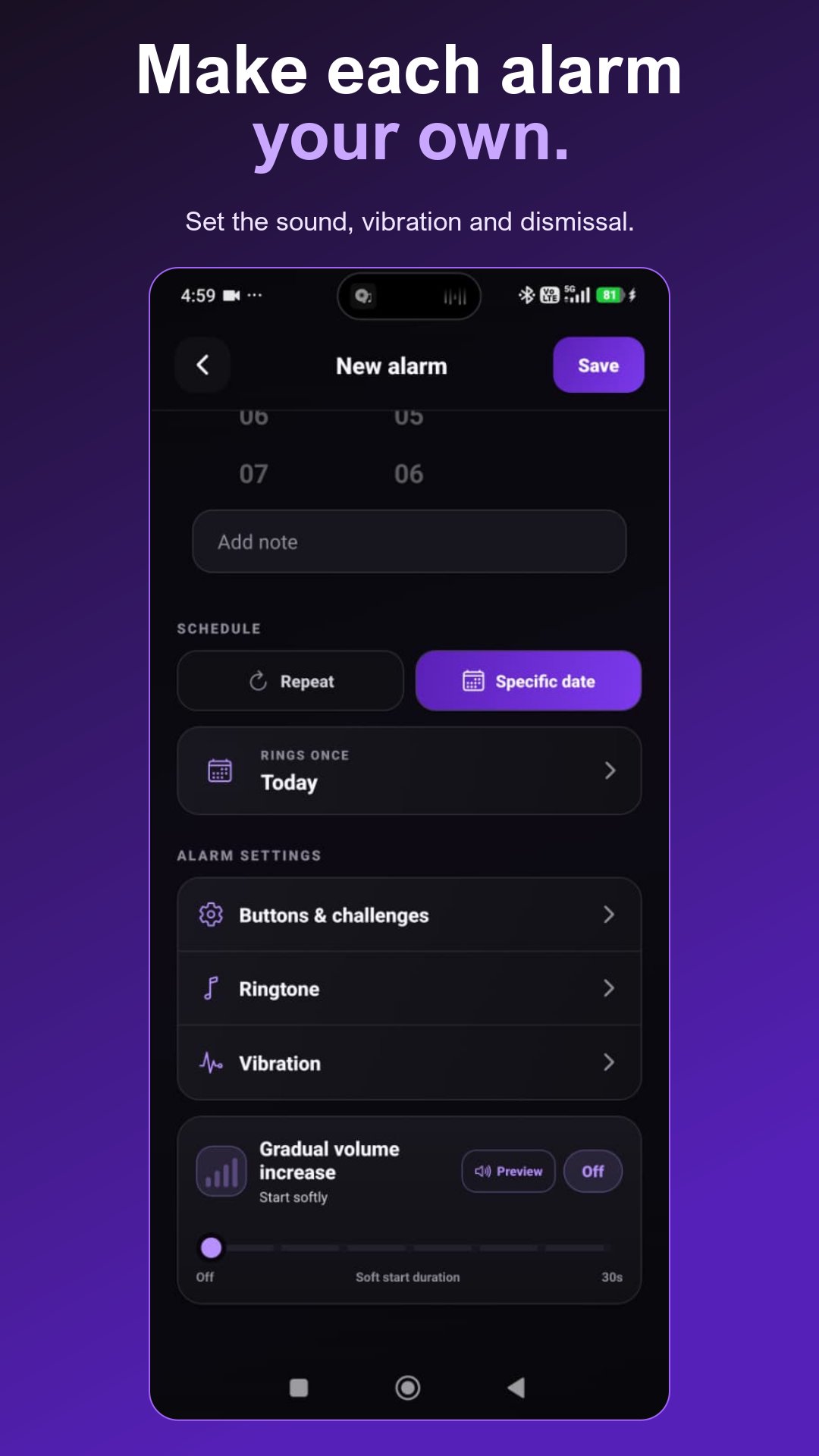
Create an alarm clock experience that works for you:
- Snooze and Dismiss, Dismiss Only, or Dismiss with Challenge
- Custom alarm ringtone and vibration
- Gradual volume increase for a smoother wake-up
- Optional alarm notes
- Selected repeat days or a specific date
■ SKIP TODAY WITHOUT BREAKING YOUR SCHEDULE
Skip Today pauses an alarm or complete sequence for the current day while keeping future days active. There is no need to disable the schedule or remember to reactivate it tomorrow. Resume Today restores any remaining alarms when your plans change again.
■ ADHD-FRIENDLY MORNING STRUCTURE
BlockWake can help people with ADHD who prefer more structure, visible steps, and repeated prompts. Alarm sequences provide several scheduled wake-up cues, while challenges introduce a deliberate action before dismissal. Simple controls make the complete morning routine easier to manage.
BlockWake is a productivity and alarm tool, not a medical, diagnostic, or ADHD treatment app.
■ CIRCADIAN RHYTHM AND SLEEP CYCLE CALCULATOR
Use the Circadian Sleep Calculator to explore possible bedtimes and wake-up times based on approximately 90-minute sleep cycles. Choose when you want to wake or sleep, then use the time wheels to view suggested schedules and plan a more consistent routine. The calculator provides timing guidance and does not diagnose or measure sleep conditions.
■ WAKE-UP INSIGHTS
Review alarm dismissals, snooze activity, Skip Today history, wake-up consistency, and changes in your morning routine. Use these insights to recognize patterns and gradually improve your alarm schedule.
■ PRIVATE AND AD-FREE
- No ads in the free version
- No personal data collected
- No account or registration required
- Alarm and routine information stays on your device
Your alarm clock should wake you, not track you.
■ BLOCKWAKE FREE AND PRO
BlockWake Free includes one alarm sequence with up to five alarms, up to five standalone alarms, essential wake-up controls, and the Circadian Sleep Calculator—with no advertisements.
BlockWake Pro unlocks unlimited alarm sequences, up to 30 alarms in each sequence, unlimited standalone alarms, additional wake-up controls and challenges, and full wake-up Insights. Pro is one lifetime purchase, not a subscription.
■ MADE FOR
- Heavy sleepers who need multiple alarms
- People seeking an ADHD-friendly alarm clock
- Students building a study or class routine
- Shift workers with early or changing schedules
- Snooze users who need wake-up challenges
- Early risers building a dependable habit
- Anyone wanting a private, organized alarm app
- Users exploring circadian rhythm and sleep-cycle timing
Latest Version
0.30.2Uploaded by
Hoàng Thuận
Requires Android
Android 12.0+
Category
Free Productivity AppContent Rating
Everyone
Security Report
Check Now
Report
Flag as inappropriateLast updated on Nov 5, 2026
Improved user experience and new features





APKPure - A multi-platform app store primarily focused on Android, providing extensive app-related content. Discover the app you want easier, faster, and safer, with quick and efficient downloads and installations.