Package Name:app.atomofiron.blockclock
SHA-256:90ef65b6c8a91ba3acd4bc9e5df773de3f6bdb662236affc7014c231c7193418
Show More
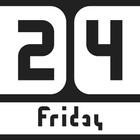
This app offers a fresh take on clock widgets. A clean, minimalist design crafted in line with current Android design trends seamlessly fits into any theme and home screen setup.
Key Features:
• Modern Aesthetics: Up-to-date style instead of outdated classic looks.
• All-in-One Customization: Full appearance customization (color schemes, transparency, styles) is available directly inside the app.
• Quick Shortcuts: Native functionality acting as convenient shortcuts to open your system alarm clock or calendar.
• Lightweight & Battery Friendly: Optimized performance with minimal battery drain and zero data collection.
How to add the widget to your home screen:
• Touch and hold an empty space on your home screen.
• Tap "Widgets".
• Find Block Clock in the list and drag the desired widget to your screen.
Latest Version
1.2.0Uploaded by
Andarious Maddox
Requires Android
Android 10.0+
Category
Free Personalization AppContent Rating
Everyone
Security Report
Check Now
Report
Flag as inappropriateLast updated on Oct 6, 2026
• System font selection: searchable family list with available styles.
• Variable font customization: weight, slant, and italic.
• Separate font sizes for time and date, plus text width adjustment.
• Automatic widget color extraction from the wallpaper, with updates when the wallpaper changes.
• AM/PM indicator in the day-of-week cell.
• Other fixes and improvements.



APKPure - A multi-platform app store primarily focused on Android, providing extensive app-related content. Discover the app you want easier, faster, and safer, with quick and efficient downloads and installations.