Package Name:com.distantstar.cartonesrs
SHA-256:2a83b65ed4890345e3ad3bfcd8feb2f8dd60ef644d46a19cc837dda3c5abba03
Show More
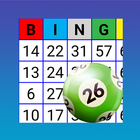
Use your mobile device or tablet as a card to play Bingo.
►Very easy to use.
►You can choose between cards for 90 Ball Bingo, 80 Ball Bingo, 75 Ball Bingo, and 30 Ball Bingo.
►The cards have large numbers for better viewing.
►You can play from 1 to 33 cards , depending on the type of bingo and whether a QR code is generated for all cards.
►Once the cards have been generated for a game, you can choose to reuse them for the next game, or discard them entirely and generate a new set.
►Cards can be configured to display using your favorite colors.
►You can buy the Premium version without ads. Go to Settings -> 3-point menu in the upper right -> Buy Premium.
►Print bingo cards, with or without a QR code, directly from the app.
►Generate QR codes of the cards to easily and quickly check the numbers on the cards. This option only works in conjunction with the App Bingo RS (minimum version 2.2.6) available on the Google Play Store.
Latest Version
1.3.3Uploaded by
Salah Didine Didine
Requires Android
Android 8.0+
Category
Free Board GameContent Rating
Everyone
Security Report
Check Now
Report
Flag as inappropriateLast updated on Aug 11, 2025
►The number of cards that can be played has been increased to a maximum of 33 cards, depending on the type of bingo and whether a QR code is generated for all cards.
►New option on phones to receive haptic feedback when marking numbers.
►Bug fixes.




APKPure - A multi-platform app store primarily focused on Android, providing extensive app-related content. Discover the app you want easier, faster, and safer, with quick and efficient downloads and installations.