* You can complete bible whole reading one time when you read only 5 chapters a day, 5 days a week! *
Bible Reading Chart Program.
You can know your reading speed, days when you complete reading, and chapters to read a day for target date on 'Sum'(Summary) page.
There are quick-bible-reading-chart what your recent read bible text. You can update your reading chapters quickly.
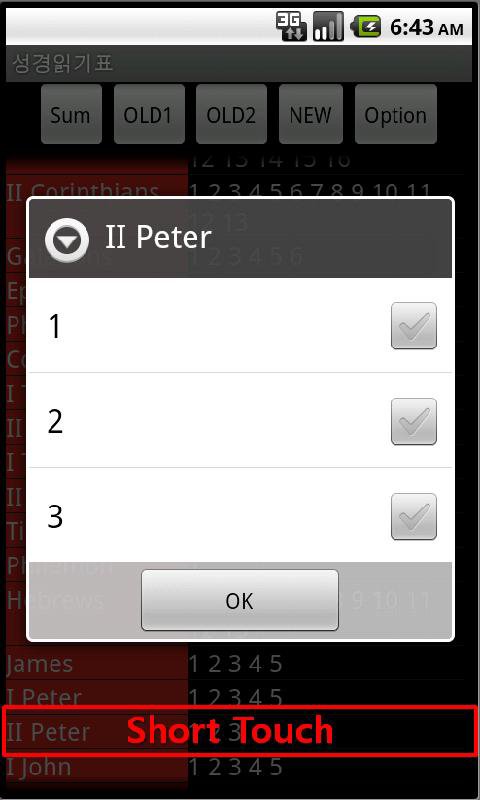
You can pop-up chapter checking window touching bible name(e.g. Genesis) or listed chapters.
You can pop-up 'check all' window by long-touch.
Basic bible reading charts are also available. I devide bible to three part - OLD testament 1, Old testament 2, and New Testament .
You can set follows on 'Option' page.
- Start Reading Date
- Target Reading Date
- Erease Reading Data (to start new reading)
You don't have to set Start Reading Date, because it is set automatically when you read first.
For more information, please visit: http://blog.naver.com/iku88/130150697890
Thank you.
* Keyword: Bible Reading, Bible Reading Table, Bible Reading Chart, Bible Reading Schedule
Latest Version
1.3Uploaded by
Rasha Mohammed Ali
Requires Android
Android 2.2+
Category
Free Tools AppContent Rating
Unrated · Warning – content has not yet been rated. Unrated apps may potentially contain content appropriate for mature audiences only.
Report
Flag as inappropriateLast updated on Jan 17, 2016
[Version 1.3]
- You can check a number of chapters that you read today on SUM Page.
Read chapters more than Recommended number of chapters a day, then you can complete to read bible on time!
[Version 1.2]
- Check All Function
You can 'Check All' chapters in a text(e.g. Genesis).
Long-touch each title or chapter list of the text.
- Loading speed of chapter list is increased.





APKPure - A multi-platform app store primarily focused on Android, providing extensive app-related content. Discover the app you want easier, faster, and safer, with quick and efficient downloads and installations.