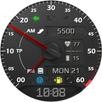
A unique and realistic AVIATOR WorldTimer with a working TURN Coordinator watch face for Wear OS!
Enjoy the classic look with functionality.
With two changeable custom complications, you can customize the info that matters to you!
NOTE: Please read the how to section and installation section !!!
ⓘ Features:
- AVIATOR design.
- WorldTimer design.
- Turn coordinator (-45°/+45° range).
- Very realistic.
- Two changeable custom complications.
- 5 different color changeable main hands.
- 8 different color changeable SECONDS hand color.
- 3 changeable BACKGROUND color/theme.
- Black theme, white theme, night theme.
- Time and date.
- Notifications count (unread).
- Heart rate display.
- Steps count display.
- Battery indicator
- Analog
- Digital
- 13 different Time Zones (Major cities around the world).
- Quick glance where is Day/Night around the world.
- London time (Digital).
- Current time (Digital).
- AOD (Always on display).
ⓘ How to:
- To customize your watch face, touch and hold on the screen, then tap on customize.
Don't miss out our top REALISTIC watch faces:
LUNA BENEDICTA - https://play.google.com/store/apps/details?id=wb.luna.benedicta
ILLUMINATOR Digital - https://play.google.com/store/apps/details?id=wb.illuminator.digital
ANALOG MASTER - https://play.google.com/store/apps/details?id=wb.analog.master
ⓘ Installation
How to install: https://watchbase.store/static/ai/
After installation: https://watchbase.store/static/ai/ai.html
If you have any issues installing the watch face, please note that we have no control over the installation process or any other Google Play / Watch processes. The most common issue that people face is after they buy the watch face and install it, they can't see/find it.
In order to apply the watch face after you install it, touch and hold on the main screen (your current watch face) the swipe left to look for it. If you can't see it, tap on the " + " sign at the end (add a watch face) and find our watch face there.
We use a companion app for the phone to make the installation process easier. If you buy our watch face, tap on the install button (on the phone app) you must check your watch.. a screen will appear with the watch face.. tap install again and wait for the installation to finish. If you already bought the watch face and it still asks you to buy it again on the watch, don't worry you will not be charged twice. This is a common synchronization issue, just wait a little or try to restart your watch.
Another solution for installing the watch face is to try to install it from a browser, logged with your account (google play account that you use on the watch).
JOIN WatchBase.
Facebook group (General watch faces group):
https://www.facebook.com/groups/1170256566402887/
Facebook page:
https://www.facebook.com/WatchBase
Instagram:
https://www.instagram.com/watch.base/
SUBSCRIBE to our YouTube channel:
https://www.youtube.com/c/WATCHBASE?sub_confirmation=1
https://www.youtube.com/c/WATCHBASE
Latest Version
Varies with deviceRequires Android
Category
Personalization AppContent Rating
Everyone
Report
Flag as inappropriateLast updated on Oct 29, 2025
This release includes minor bug fixes and general improvements. Update to the latest version for the best experience.



APKPure - A multi-platform app store primarily focused on Android, providing extensive app-related content. Discover the app you want easier, faster, and safer, with quick and efficient downloads and installations.