Scan Date:Apr 16, 2026
Show More

AutoZen fits drivers who mount a phone in the car and want fast access with fewer distractions. It brings maps, music, calls, and messages into one clear screen so you can keep attention on the road. The layout is easy to see at a glance, and voice control keeps your hands on the wheel. Before a commute or a road trip, you can download AutoZen to set up a driving dashboard that suits your routine.
Turn by turn navigation and traffic
AutoZen guides you with turn by turn directions and accurate traffic ETAs. You can search places and points of interest and then follow clear instructions to your destination. Speed camera alerts help you stay aware of road limits as you drive. Real time info keeps routes up to date when conditions change.
Voice control for your drive
Beyond maps, you can control key actions by voice. The built in assistant works hands free for navigation, music, calls, weather, and contacts, and you can also use Google Assistant if you prefer. Speak to start a route, call a favorite contact, or play an album without touching the screen. This reduces taps and helps you keep focus on the road ahead.
Media hub with popular services
For audio, the media hub centralizes your apps in one place. AutoZen supports one tap control for services like Spotify, Deezer, Pandora, and Tidal, so switching between music and podcasts is quick. You can pause, skip, or change sources with large buttons that are easy to reach. This keeps entertainment simple while you drive.
Message reading and replies
When messages arrive, AutoZen can read them aloud from SMS, WhatsApp, Telegram, Signal, and Messenger. You can dictate a reply by voice and send it without looking away from the road. Notifications are presented in a driver friendly way so you can decide when to respond. This balances awareness with reduced distraction.
Custom dashboards, widgets, and split screen
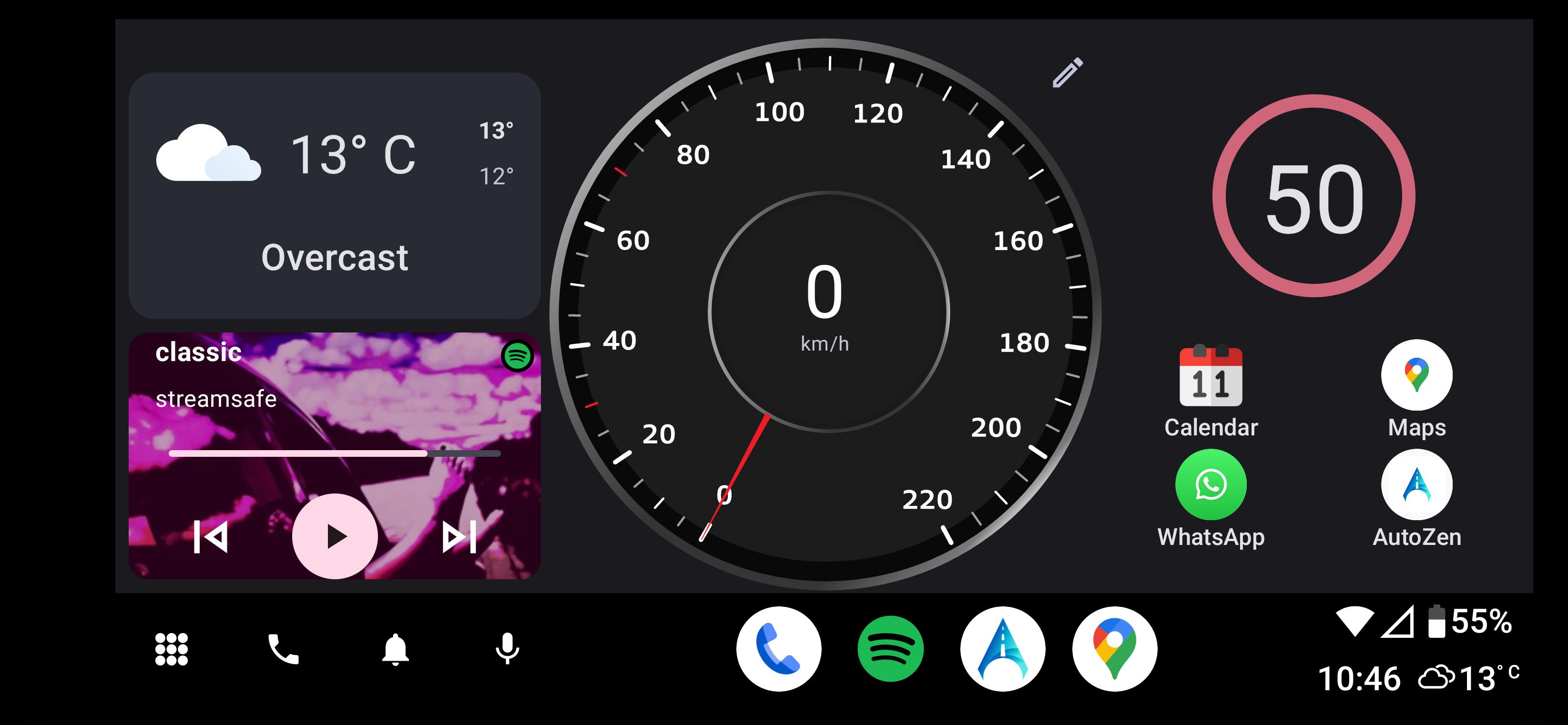
To match your car setup, you can customize multiple dashboards and add widgets. AutoZen supports Android and Google Maps widgets and offers a split screen Coolwalk style layout, so maps can show next to media or calls. The interface is built to be glanceable with large tiles and simple controls. TPMS display and real time weather are available when supported, giving quick at a glance status during a trip.
AutoZen works as a standalone phone app that runs on your Android device. It does not require a car head unit that supports Android Auto, and it does not replace your vehicle’s built in system. Many users mount the phone on a holder and use Bluetooth or AUX for audio. If you want the app on a car screen, you can explore screen mirroring options that your vehicle supports.
AutoZen integrates with Google Maps through widgets that you can place on your dashboard. This lets you view maps next to media controls or calls without switching apps. You can keep the route visible while controlling playback or checking weather. The goal is quick access to frequent actions with fewer steps.
Information about any premium options, trials, or plan differences is presented inside the app. To view current offers, open the settings or the in app purchase section after installation. Availability and pricing may vary by country and currency. Check inside the app for the most up to date details before making a choice.
To get started, install the AutoZen latest version and set it up before your next drive. A short setup helps you pick a dashboard, link services, and enable voice control. Once ready, you can place the phone in a car mount and keep focus on the road.
AutoZen brings navigation, media, calls, and messages into a driver friendly layout you can control by voice. If you prefer manual control, large buttons and a clean dashboard keep actions simple. To install on your device, get the AutoZen APK and follow the setup steps above.
For official details and support, visit the link below.
Latest Version
7.1.4Uploaded by
Firyal Nailau
Requires Android
Android 7.0+
Category
Free Auto & Vehicles AppContent Rating
Everyone
Security Report
Report
Flag as inappropriateLast updated on Apr 5, 2026
New:
Bugfixes, speedometer working on Nav, sunrise/sunset theme, UI improvements
* Change Driving avatar in the map for a selected car
* Improved System widgets not loading/displayed
MAJOR UPDATE: A New Customizable Launcher!
Experience a driving experience with our completely redesigned launcher
* Enhanced Performance
* Drag-and-drop widget customization
* Native Android widget support + built-in widgets
* Adaptive layouts to perfectly fit any screen
Update now!



APKPure - A multi-platform app store primarily focused on Android, providing extensive app-related content. Discover the app you want easier, faster, and safer, with quick and efficient downloads and installations.