Accessible NXT is a switch-accessible app that lets you control your Lego Mindstorms NXT robot. Children can use touch to interact with the robot GUI or use an external switch connected through a Bluetooth switch interface such as TabAccess. The app is designed to engage children with motor disabilities in robot educational activities.
To use this app, set up your robot using the following steps:
* Bluetooth - Using the robot’s GUI, navigate to settings and turn on Bluetooth
* Motors - Connect robot wheel motors to outputs B and C
* Activate app – Select NXT name from Bluetooth list
Basic commands for commanding the robot include:
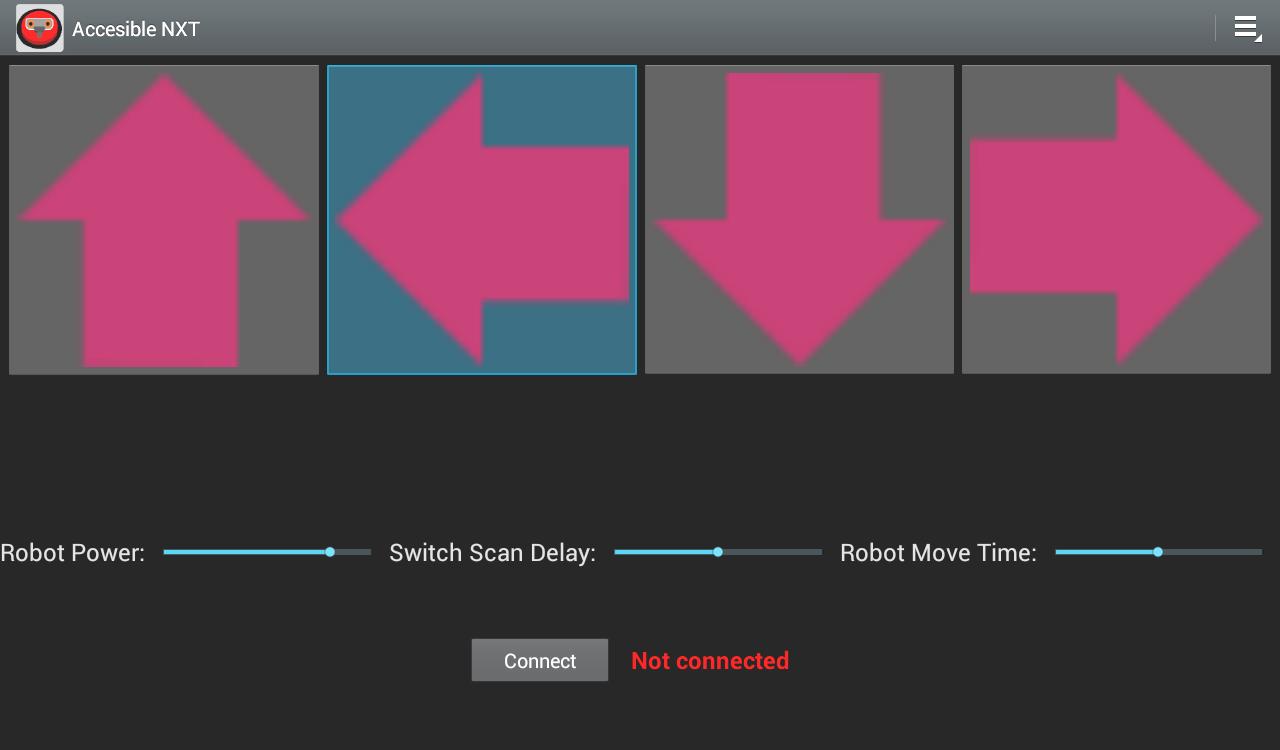
* Arrows - Use arrows to provide move commands to the robot
* Robot Power – Use this option to change the speed of a robot movement
* Robot Move Time – Use this option to change the duration of a robot move
* Swap forward/reverse - Under the settings menu, this option swaps between forward and backward directions
* Swap left/right- Under the settings menu, this option swaps between left and right turns
There are various settings that can be used to change the accessibility defaults. Most of the default accessibility parameters can be assessed through the settings option located at the top left of app. The following settings are provided to change the accessibility defaults.
* Switch Scan Delay - Use this setting on the main GUI to control speed of scanning commands
* Scanning On - To activate/deactivate scanning, select this option. Scanning enables automatic scanning through the robot arrow commands. When an arrow command is highlighted, pressing a switch activates that command.
* Switch Accessible - To activate/deactivate switch-access, select this option. When scanning is off but switch-access is on, the app uses the following inputs: Key 1 = Left, Key 3 = Right, Space = Select
This app currently works for the Lego Mindstorms NXT robot. An accessible version for Lego Mindstorms EV3 robot is coming soon.
Latest Version
1.0Uploaded by
Igor Śnioch
Requires Android
Android 2.1+
Category
Free Education AppContent Rating
Everyone
Report
Flag as inappropriateLast updated on Jan 2, 2016
Minor bug fixes and improvements. Install or update to the newest version to check it out!





APKPure - A multi-platform app store primarily focused on Android, providing extensive app-related content. Discover the app you want easier, faster, and safer, with quick and efficient downloads and installations.