YesTube helps when you want to watch clips on a flight, listen without using data, or keep files neatly organized. It focuses on simple steps from finding a video to storing it for later, so you can stay in control even with a slow connection. With clear options and a tidy library, it keeps downloads easy to manage across different types of media. If you often save media for trips or commutes, download YesTube to handle everything in one place.
Multi platform downloads
YesTube lets you save videos and music from popular services including YouTube, Facebook, Twitter, Instagram, TikTok, and more. You can collect content to your phone for offline viewing or listening without relying on a live connection. As a YesTube video downloader, it focuses on stable capture across sites while keeping choices clear and simple.
Built in browser and quick capture
When discovery comes first, YesTube includes a built in browser that auto detects videos on a page and shows download options. You can also paste a link or type keywords in the search bar, then confirm with one tap. This mix of browsing, search, and URL paste helps you move from finding a clip to starting a download with fewer steps.
Format and quality choices
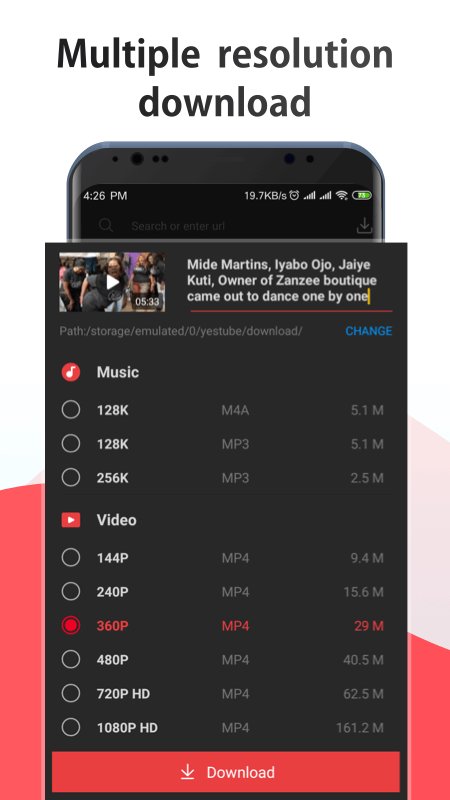
YesTube presents format and resolution options before saving, so you can pick what suits your device and storage. Choose MP4 for video or MP3 for audio only, plus other formats like M4A, M4V, MOV, AVI, and WMV. Resolutions can range up to 4K, with choices like 2K, 1080p, and 720p for a smaller file size when needed.
Playlists, torrents, and Magnet links
Beyond single videos, YesTube can handle YouTube playlists in one flow. It also supports torrent files and Magnet links, which helps centralize different download types in one app. Other file types are supported as well, including APKs, so you can keep various downloads in a single place.
Offline library, player, and privacy
After saving, YesTube sorts your items by date in a clear library, and it includes an in app player for both video and music. A password protected folder is available for sensitive files you prefer to keep private. Downloads work over WiFi or mobile networks including 4G, 3G, and 2G, so you can save content wherever you have a connection.
YesTube supports content from major platforms such as YouTube, Instagram, Facebook, Twitter, and TikTok, along with other sources. It can also process torrent files and Magnet links, which is useful for larger items or batch downloads. Availability can change if a site updates its layout, so if a link fails, try loading the page in the built in browser and let auto detect find the media.
For everyday use, MP4 is a common video choice that plays on most phones, while MP3 or M4A suits audio only saves. Higher resolutions like 4K or 2K offer more detail but use more storage and data, while 1080p or 720p balance clarity with smaller file sizes. Before confirming, check the expected size so you can keep enough space for future downloads.
Use the password protected folder for files you do not want to appear in regular galleries. Always respect the terms of each platform and follow copyright rules when saving or sharing content. If content is not meant for download, get permission or choose a different source that allows saving.
The steps below outline how to find, save, and play media in the app. If you installed the YesTube APK, this quick flow will help you move from discovery to offline playback without extra tools.
YesTube brings video and music saving into one place with clear controls, format choices, and an organized library for offline playback. To begin, install the YesTube latest version and follow the steps to capture the media you want to keep.
Latest Version
4.2902Uploaded by
YesTube
Requires Android
Android 4.0.3+
Available on
YesTubeCategory
Free Entertainment AppReport
Flag as inappropriateLast updated on Mar 21, 2023
Minor bug fixes and improvements. Install or update to the newest version to check it out!





APKPure - A multi-platform app store primarily focused on Android, providing extensive app-related content. Discover the app you want easier, faster, and safer, with quick and efficient downloads and installations.