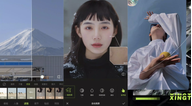

Xingtu - 醒图 suits users who want quick, natural photo fixes without complex steps. It helps you clean up portraits, refine tones, and create a consistent look for daily sharing or creative posts. The interface keeps common tools easy to reach, so beginners can start fast while experienced users can fine-tune results. As a result, you can handle everyday adjustments and try stylized edits in one place. Many users look to download Xingtu - 醒图 when they need a reliable, simple editor.
Xingtu - 醒图 provides a one-tap beautify option that aims for natural skin tone and detail. It focuses on clean results that avoid an overly white look, keeping texture visible. This helps portraits appear refined while staying true to the original image.
AI-assisted editing toolsWith AI support, Xingtu - 醒图 can guide image fixes and smart retouching to save time. These tools help you address common photo issues more efficiently and keep adjustments consistent. This approach reduces manual work while maintaining control over visible changes.
Professional basic controlsXingtu - 醒图 includes precise sliders for brightness, contrast, and exposure. You can adapt photos to different lighting and match the tone you prefer. Fine control over these parameters supports both quick corrections and more careful editing sessions.
Creative filters and effectsYou can apply a variety of filters and effects to shape a distinct style. Xingtu - 醒图 lets you preview changes and adjust intensity to fit each photo. This makes it easier to produce a cohesive look across multiple images.
Free access to core toolsMany core features in Xingtu - 醒图 are available to use at no cost on Android. You can explore beautify, AI assistance, and essential adjustments without barriers. This setup helps users test and refine workflows before considering extra options.
This quick guide shows how to begin editing with familiar controls and simple steps. To try new and updated tools, install the Xingtu - 醒图 latest version available here. Start with a single photo, then move to more detailed edits as needed.
Xingtu - 醒图 combines one-tap beautify, AI assistance, and dependable basic controls for everyday photo retouching. To begin on Android, get the Xingtu - 醒图 APK and follow the steps above.
Latest Version
14.6.0Uploaded by
Shenzhen Lianmeng Technology Co.Ltd
Requires Android
Android 5.0+
Available on
Xingtu
Category
Free Photography AppReport
Flag as inappropriateLast updated on May 2, 2026
Minor bug fixes and improvements. Install or update to the newest version to check it out!




APKPure - A multi-platform app store primarily focused on Android, providing extensive app-related content. Discover the app you want easier, faster, and safer, with quick and efficient downloads and installations.