Scan Date:Mar 3, 2026
Show More
This is Ultra-High-Functional Text Editor app! You can Ultra-Comfortable Text Editing!
Can be use it for Free, so please try to experience Ultra-Comfortable Text Editing Environment! You may not be able to let go because it is Too Comfortable!
Developed from scratch for Comfortable Text Editing! Significantly reduce the Stress of Text Editing on Android!
To make Text Editing comfortable, have many useful functions, it can be used as the center of Text Editing work such as Memo, Note, E-Mail, Outline, ToDo, Idea memo, Twitter, etc!
Built-in Ultra-High-Functional File Manager makes File Management even more comfortable!
Built-in the Outline function makes Text Editing Super Comfortable! (It probably does not need an app dedicated to Outline!)
Built-in the Check Mark function can be used like a ToDo list! (It probably does not need an app dedicated to ToDo!)
Since almost all the functions can be operated on the key, it is possible to operate the same as the PC/Mac environment by using an External Keyboard! (Do not need PC/Mac anymore!)
The name of the app is called "Wrix" ("Wrikes") and in conjunction with the "Write" and "Likes".
As the name suggests, we put a lot of useful features think want to Text editing.
So, please enjoy a comfortable Text Editing!
Note:
+Can be use it for Basically Free, but some features will require a License
+The License will reduce the burden on the User and then a small charge (monthly subscription) to Maintain Development
+There is a 24-Hour Free trial period can be used when install or version up.
+Compatible with Android 11!
+If the Menu etc. is hidden under the Soft Keyboard, please review the settings on the "Popup Settings" screen.
- Text Edit Screen -
The functions to be provided are as follows.
+Supports editing of Multiple Documents
+Undo/Redo (Unlimited Number of Times)
+Find function (Highlighting, Regular Expression, Replace, etc)
+Multiple File Search (grep)
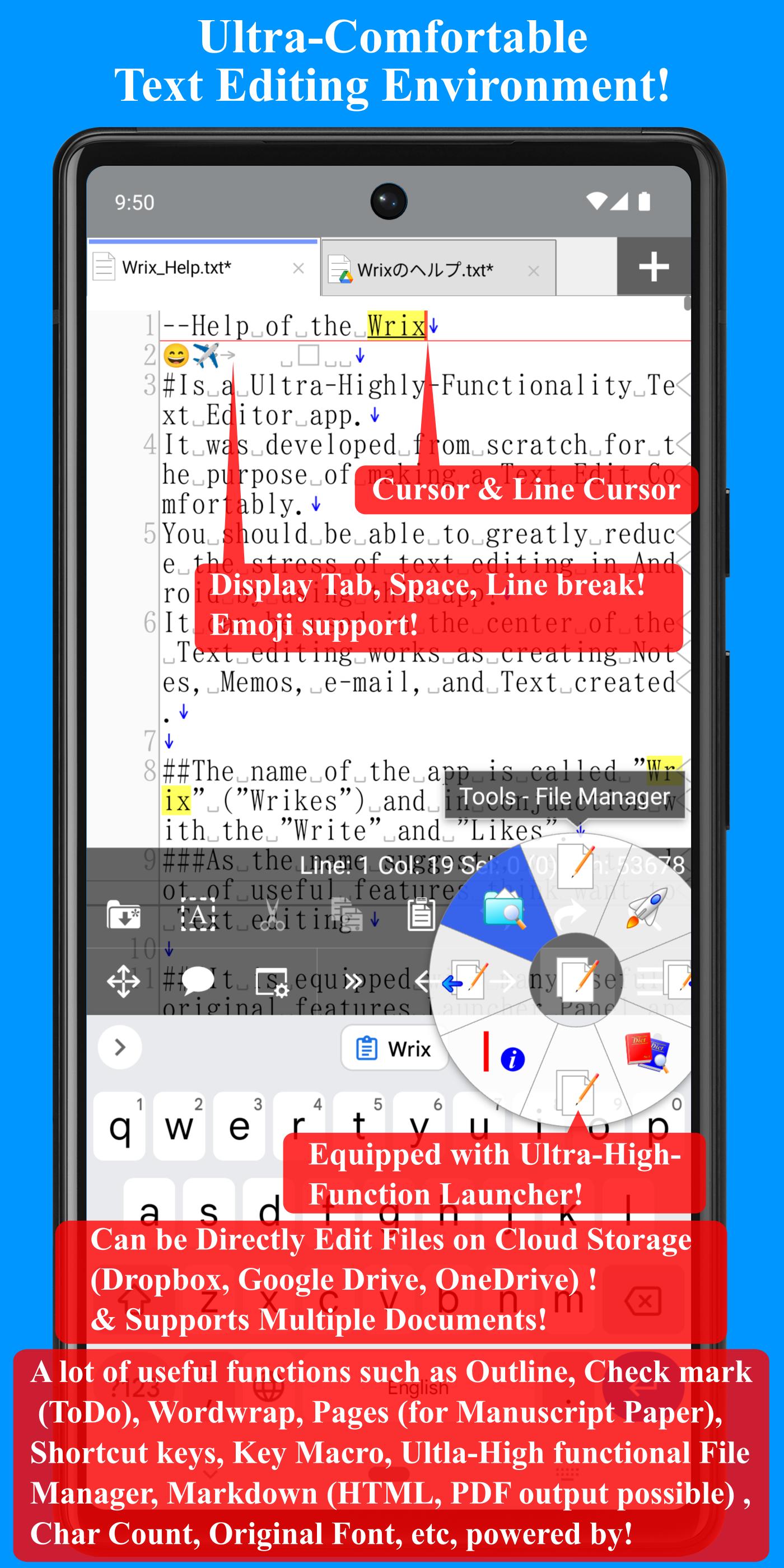
+Special display of non-displayable that Tab, Half/Full-Width Space, and Newline Character
+Select-mode for Easy Text Selection
+Key Macro
+Drag & Drop
+Launcher that can be called a function quickly
+Key Shortcut
+Auto indent
+Tab Indent
+Word Wrap
+Line Spacing
+Pages (It can be used like Manuscript paper!)
+Typography
+Outline
+Check Mark
+Markdown (Supports HTML, PDF format output!)
+Variety of tools (File Manager, Internal File Browser, Clipboard Information, QR code Reader/Generator, etc)
+Text Insertion function that can be quickly inserted the Text you have Registered
+Dictionary Search (send specified text to an external app or website for quick search!)
+Text to Speech (Male and Female, Language)
+Voice Input Support functions
+Cursor bar (Assists in moving the Cursor and at the same time makes Key Macros easier to use!)
+Various conversion function of character. Case conversion, Full-width Half-conversion
+Show the Information of the Selected range
+The special display Tab, Space, a Line break character
+Show / Hide Line numbers (In addition to the Line Number, the Number of Wrapped Lines can be displayed)
+Cursor position (Line number and Position), number of Selected Characters and Lines, display of number of Characters
+Can be sent File/Text to Another App
+Can be Edit Files on Another Apps such as Cloud Storage
+Import/Export the files (Can be Import/Export the files from/to other apps such as File Manager, Cloud Services)
+ Uses an Original Monospaced Font that makes it easy to understand the number of characters! (There is also a character count display)
+etc
Because there are a number of features as described above, it becomes difficult to call the function that is deep in the menu normally.
However, it is possible by the use of such key or shortcut launcher panel, call quickly to frequently used functions.
- File Management screen -
The functions to be provided are as follows.
+List Files/Folders
+Edit File/Folder (Move, Copy, Delete, etc)
+Sort
+Search
+Bookmarks
+Import/Export
+etc
Latest Version
2.8.1Uploaded by
الداعي لله العظيم برحمته
Requires Android
Android 9.0+
Category
Free Productivity AppContent Rating
Everyone
Security Report
Report
Flag as inappropriateLast updated on Oct 15, 2025
+ Fixed an issue where the connection to Google Play's License Management function would fail when the app was launched.
The library provided by Google sometimes fails to connect to the service, so we have removed the process.
If you receive a connection failure error on the license management screen, please try restarting the app. If this does not resolve the issue, please try restarting your OS.
+ Updated the using Libraries.




APKPure - A multi-platform app store primarily focused on Android, providing extensive app-related content. Discover the app you want easier, faster, and safer, with quick and efficient downloads and installations.