⚠️ Important: This watch face is compatible only with devices running on Wear OS 5 and higher.
⚠️ Critical Compatibility Alert: Due to known software conflicts, this watch face is not compatible with the Samsung Galaxy Watch 6 model. Purchase is not recommended.
______________________
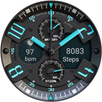
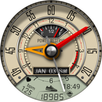
Your ultimate data dashboard has arrived. Experience the perfect fusion of classic analog style and a high-tech digital display with our hyper-realistic watch face, offering a stunning LED-illuminated night mode and all the health and weather data you need.
ⓘ Features:
- 10 Day Color Themes
- 9 Day Color Themes
- AOD display
- 2 Editable Complications
- Health Data: Steps and Heart rate
- Month, Date & Day of the Week
- Battery Indicator
- Moon Phases Indicator
- Unread Messages Indicator
- UV Index
- Steps Tracker
- Heart Rate
________
* NOTE
The watch face automatically adjusts temperature units (Celsius or Fahrenheit) to match your watch/phone settings. No manual changes needed - just set your preference in your device settings.
________
ⓘ How to:
To customize your watch face, touch and hold on the screen, then tap on customize.
⚠️ Switching Between Day & Night Themes
> When you enable NIGHT themes, to get back to DAY themes you MUST switch off the night themes first by selecting the first option in the Night themes.
________
ⓘ Installation
How to install: https://watchbase.store/static/ai/
After installation: https://watchbase.store/static/ai/ai.html
If you have any issues installing the watch face, please note that we have no control over the installation process or any other Google Play / Watch processes. The most common issue that people face is after they buy the watch face and install it, they can't see/find it.
In order to apply the watch face after you install it, touch and hold on the main screen (your current watch face) the swipe left to look for it. If you can't see it, tap on the " + " sign at the end (add a watch face) and find our watch face there.
We use a companion app for the phone to make the installation process easier. If you buy our watch face, tap on the install button (on the phone app) you must check your watch.. a screen will appear with the watch face.. tap install again and wait for the installation to finish. If you already bought the watch face and it still asks you to buy it again on the watch, don't worry you will not be charged twice. This is a common synchronisation issue, just wait a little or try to restart your watch.
Another solution for installing the watch face is to try to install it from a browser, logged with your account (Google Play account that you use on the watch).
______________
JOIN WatchBase.
Facebook Group (General watch faces group):
https://www.facebook.com/groups/1170256566402887/
Facebook:
https://www.facebook.com/WatchBase
Instagram:
https://www.instagram.com/watch.base/
TikTok:
https://www.tiktok.com/@live.wowpapers
SUBSCRIBE to our YouTube channel:
https://www.youtube.com/c/WATCHBASE
Latest Version
Varies with deviceRequires Android
Category
Personalization AppContent Rating
Everyone
Report
Flag as inappropriateLast updated on Dec 10, 2025
Minor bug fixes and improvements. Install or update to the newest version to check it out!




APKPure - A multi-platform app store primarily focused on Android, providing extensive app-related content. Discover the app you want easier, faster, and safer, with quick and efficient downloads and installations.