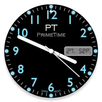
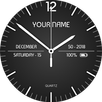
- Custom ambient Mode brightness
- Change color of watchface
- Change color of background
- Choose optional display
- Month, day, battery, or none
Installation
It will be installed on your watch automatically from your phone paired with your watch after a short time and please wait. (may take a few minutes)
After installation,you can choose the watch face from the setting menu.
Or just long tap on the current watch face screen,so watch face selector screen will open.
Settings:Ambient Mode Brightness *
You can change watchface brightness on Ambient mode.
* Tap the watchface icon on your PHONE to setup.
Latest Version
1.18Uploaded by
Hidayah Abdullah
Requires Android
Android 4.1+
Category
Free Personalization AppContent Rating
Everyone
Report
Flag as inappropriateLast updated on Jan 7, 2021
NEW Api's
fixed some minor bug's



APKPure - A multi-platform app store primarily focused on Android, providing extensive app-related content. Discover the app you want easier, faster, and safer, with quick and efficient downloads and installations.