Smoke Filter Mod 1.12.2/1.10.2 (Air Filter)
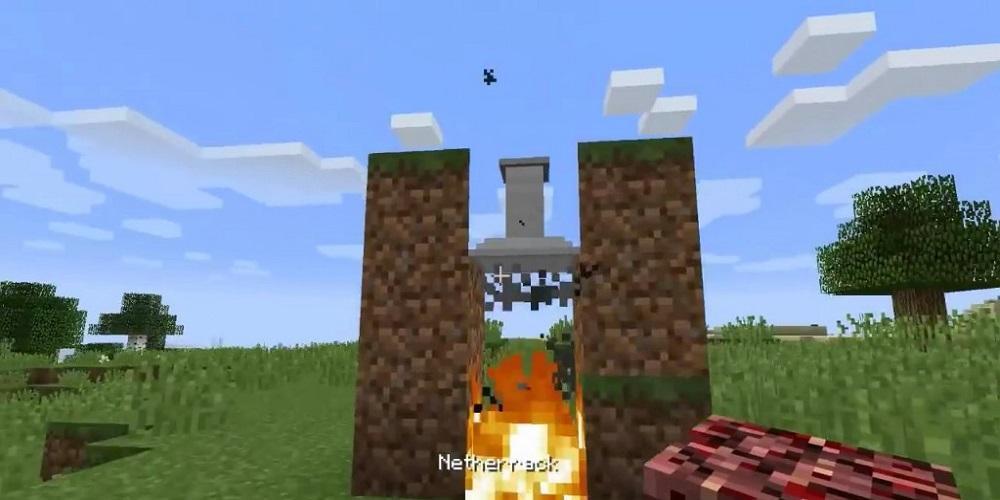
Smoke Filter Mod 1.12.2/1.10.2 adds a new Airfilter to clean the air above a fire for receiving some ash. The airfilter must be placed one block above the fire for being active. If active, the Airfilter will filter one ash powder, out of the air, every 200 ticks sec. The Airfilter has only enough space to store one ash powder.
How to install:
Make sure you have already installed Minecraft Forge.
Locate the minecraft application folder.
On windows open Run from the start menu, type appdata and click Run.
On mac open finder, hold down ALT and click Go then Library in the top menu bar. Open the folder Application Support and look for Minecraft.
Place the mod you have just downloaded (.jar file) into the Mods folder.
When you launch Minecraft and click the mods button you should now see the mod is installed.
Phiên bản mới nhất
1.0Được tải lên bởi
Мария Антуанетт
Yêu cầu Android
Android 4.0+
Danh mục
Miễn phí Phiêu lưu TRÒ CHƠIXếp hạng nội dung
Everyone
Báo cáo
Gắn cờ là không phù hợpLast updated on Feb 11, 2019
Phiên bản này bao gồm các bản sửa lỗi nhỏ và cải tiến chung. Hãy cập nhật lên phiên bản mới nhất để có trải nghiệm tốt nhất.





APKPure - Kho ứng dụng đa nền tảng chủ yếu tập trung vào Android, cung cấp nội dung phong phú về ứng dụng. Khám phá ứng dụng bạn muốn dễ dàng, nhanh chóng và an toàn hơn, với tính năng tải xuống và cài đặt nhanh chóng và hiệu quả.