
Package Name:com.uvigo.gti.VirtualTEC
SHA-256:a80f42a9436f357a9a9f39121bae2e028c87ff4cfebed920bb47d5897d025def
Show More
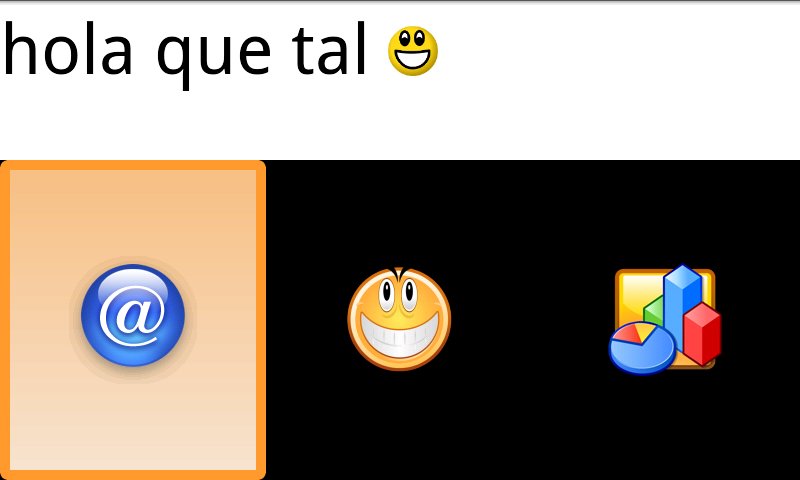
Application designed to meet the needs of physically impaired people with very restricted controlled movement. It features a virtual keyboard aimed to be a means of alternative communication and thus improve their life quality. All fields and items are scanned, being highlighted as ‘active item’ the one in orange. To access the active item, a touch anywhere on the screen acts as input method. It also includes a voice synthesizer that reads aloud the messages provided by the user to third parties.
It is divided into the following fields:
*Vowels
*Consonants
*Numbers
*Symbols
*Smileys
*Frequent actions (stored by the user himself).
*End (when the user concludes a message to be sent to the speech synthetizer and saved in a database).
*Save Frequent Action (the message will be read aloud by the TTS and will subsequently appear in the frequent action field).
*Delete.
This application also provides a menu with different items: settings, recent messages, about and exit.
Regarding ‘Settings’ menu item, it offers the following possibilities:
*Language (vowel and consonant order, voice synth configuration, etc. depending on the language).
*Type (to select the number of items in the scanning area).
*Scanning speed.
*Speech Synthetizer (enabled/disabled)
*Touch (to access a field or item by simply touching anywhere on the screen, or pressing and releasing anywhere to access the active item).
When selecting the ‘recent messages’ menu item, the system will display the last twenty messages communicated by the user by activating the ‘End’ field on VirtualTEC. The very last message will be the first on the list.
Finally, the menu item ‘About’ simply provides information about the VirtualTEC
To make the voice synthesizer work:
For version 2.1:
- Go to page http://code.google.com/p/eyes-free/downloads/list and download packages "tts_3.1_market.apk" and "com.svox.langpack.installer_1.0.1.apk". Install them on the device.
From version 2.2:
- Go to "Settings> Voice Input and Output", click on "Settings speech synthesis" and then "Install voice data files."
Latest Version
1.3Uploaded by
Stefa Rodriguez
Requires Android
Android 4.0+
Category
Free Communication AppContent Rating
Everyone
Security Report
Check Now
Report
Flag as inappropriateLast updated on Oct 16, 2019
Removed some permissions.



APKPure - A multi-platform app store primarily focused on Android, providing extensive app-related content. Discover the app you want easier, faster, and safer, with quick and efficient downloads and installations.