The concept:
This is a musical instrument that uses movement instead of a keyboard for input, using the camera on your device.
How to use:
When you start the app, the camera preview is shown to you. Use the on/off button on the screen to switch the synth on and start moving to hear the music that you are making by moving in front of your device camera.
Explore the app:
The music isn't randomly created by movement, this is an instrument that can be controlled as you would expect with any kind of keyboard or other electronic instrument.
The optimum position to control the Mov Synth properly is to set your device flat on a table and position your hands above it, about 10cm away from the screen, creating movement with your fingers. The optimum distance from the screen will depend on the settings you choose and the lighting conditions, but 10cm (4 in.) is a good position to start at.
Beware of shadows: if there is a light source behind you, and you move your body a bit, the app may pick up your body movement via your body shadow, even if you didn't intend this movement to be picked up.
If the scenery around you changes, the app will pick this up and interpret it as a movement so this is not suitable for use on the move.
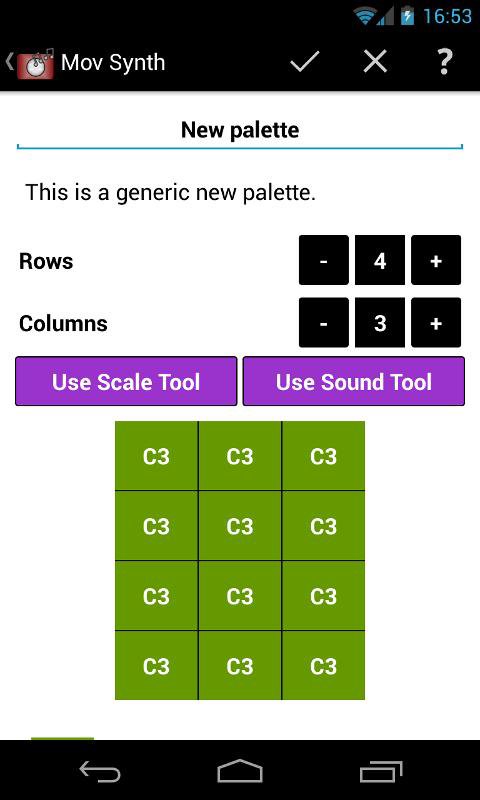
The app uses a "palette", which is essentially a grid, with a sound and note/octave associated with each cell. You can view the current palette laid over the camera input (use the "eye" button in the action bar).
Camera Note:
This is more fun with a front facing camera, so you can see the screen while moving. The screen is useful to look as it gives you visual feedback by highlighting your movements on the palette grid.
Audio Note:
The app uses puredata patches to generate the sounds.
On many devices, the sound quality is better if you use the headphones rather than the built in speaker on the device.
Here is what some users have told us about using MovSynth:
1) on stage, with a desk lamp near them to control the light input, tablet on a stand, playing with hands above tablet
2) at parties, phone stood in a discrete location, to surprise guests as they walk past (and get them interested in creating music!)
3) with young children, to play simple melodies and develop a sense of spacial and musical awareness (hopefully!)
4) for ear training, playing with closed eyes, guess the note then look at the screen to check which cell is highlighted
5) for songwriting, to remove the restrictions of finger memory (from years of playing and writing on the piano or guitar) for creating melodies
6) for improvisation and experimentation, playing with full body at a distance of 1 to 2 metres
Development Note:
This is version 0.6: there are still some limitations to the app, but more and more features are added.
Some of the features we are working on: new sounds, recording/playback, adding effects to sounds etc Your feedback is extremely valuable to us, do not hesitate to leave your suggestions in a review or email us.
The app has been thoroughly tested on the Samsung Galaxy SII, Sony Tablet S, Nexus 4, Nexus 7 and HTC One S. Users have also reported the app works well on a variety of devices by HTC, Motorola, Asus, Acer and Sony Ericsson. If you notice any issue on your device, please email us to let us know.
We provide a new way to interact with your device to make music, you provide the creativity!
تازہ ترین ورژن
0.6اپ لوڈ کردہ
جعفر عباس العبودي
Android درکار ہے
Android 2.3.2+
کٹیگری
مفت موسیقی اور آڈیو ایپمواد کی درجہ بندی
Everyone
رپورٹ کریں
فلیگ غیر موزوں ہےLast updated on Jan 21, 2016
- small UI improvements, including choosing the colour used to highlight the movements picked up by the synth when playing
- small bug fixes





APKPure - ایک ملٹی پلیٹ فارم ایپ اسٹور جو بنیادی طور پر اینڈروئیڈ پر مرکوز ہے، جو وسیع ایپ سے متعلق مواد فراہم کرتا ہے۔ اپنی مرضی کی ایپ کو آسانی سے، تیزی سے اور محفوظ طریقے سے دریافت کریں، تیز اور موثر ڈاؤن لوڈز اور انسٹالیشنز کے ساتھ، جو آپ کی ضروریات کو پورا کرتے ہیں۔