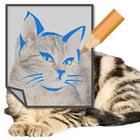
This app overlays half transparent drawing pad(painting tool) on your smart phone just like a tracing paper.
You can trace over any image(characters, cartoons) on the internet, or pictures at your phone gallery.
How to Use
1. Run Tracing Paper App and change it to an icon in Status(Notification) Bar.
2. Find an image to trace over on the internet or at your gallery. Make it proper size.
3. Click the Tracing Paper in Status Bar, and a half transparent drawing pad appears. Draw following the image underneath.
Features
1. drawing tools: pencil, pen, eraser, filler
2. color palette: google colors
3. zooming: useful when fingers to draw
4. loading images: on drawing pad or under drawing pad
Latest Version
2.0.4Uploaded by
Almir Torres
Requires Android
Android 5.0+
Category
Free Tools AppContent Rating
Everyone
Report
Flag as inappropriateLast updated on May 12, 2018
Icon Modification





APKPure - A multi-platform app store primarily focused on Android, providing extensive app-related content. Discover the app you want easier, faster, and safer, with quick and efficient downloads and installations.