Package Name:org.prowl.torquefree
SHA-256:ae6262945cd2fb75ce0376b12ed1939dc746e2bf1e7e2825c922b6b947acc163
Show More

Torque Lite (OBD2 & Car) helps drivers see engine information, check basic diagnostics, and watch what the car is doing as it runs. It pairs with a Bluetooth ELM adapter to read the engine control unit, so you can monitor values while driving or idling. This basic release is useful for testing adapter and vehicle compatibility, and some vehicles may support fewer functions than others. Many users download Torque Lite (OBD2 & Car) to confirm a working setup before relying on it every day.
Read and clear fault codes
Torque Lite (OBD2 & Car) shows diagnostic trouble codes stored in the ECU and lets you clear them after repairs. Live sensor readings can appear with code details when supported. Availability depends on the vehicle ECU and the adapter used.
Real time gauges and HUD
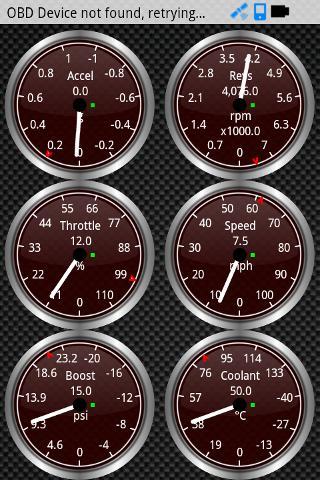
Next, you can build a simple dashboard with gauges and dials, and apply themes that suit your view. A GPS HUD mode mirrors your speed for night driving, making it easier to check speed without looking down.
Data logging and export
Adapter and vehicle support details
Finally, the Torque Lite (OBD2 & Car) APK works with common Bluetooth ELM adapters that connect to OBD2 ports. It has been used on many makes across regions, yet some Nissan, Chrysler, or Subaru ECUs may not function correctly in this basic version. The Pro edition adds USB ELM support using Prolific or FTDI chips and wider coverage.
To begin, pair a compatible Bluetooth ELM adapter, open the app, and connect to the vehicle. View sensors, read codes, and log trips for review. For best results, install the Torque Lite (OBD2 & Car) latest version and check that your car and adapter combination works as expected.
Latest Version
1.2.22Uploaded by
Hein Thurein San
Requires Android
Android 2.3.2+
Category
Free Communication AppContent Rating
Everyone
Security Report
Check Now
Report
Flag as inappropriateLast updated on Jan 13, 2018
* Faster start up of app
* Fix a few more issues with blank screen when starting
* Update to allow BLE adapter connectivity
* Security fix in trip exporter
* Bluetooth select dialog is easier to use


APKPure - A multi-platform app store primarily focused on Android, providing extensive app-related content. Discover the app you want easier, faster, and safer, with quick and efficient downloads and installations.