Scan Date:Nov 21, 2025
Show More
When.Do is a simple and easy to use To Do List app.
It is designed to boost your productivity, and make your life easier.
You can work with a single checklist of to-dos, or have a number of lists sorted into different notebooks.
Key Features
- Efficient task management.
- Navigate between lists and tasks by swiping left and right.
- Get reminded on time.
- Set up recurring tasks.
- Home screen widgets show you what to do, and when to do.
- Flawless sync with Google Tasks.
- Use multiple Google Tasks accounts.
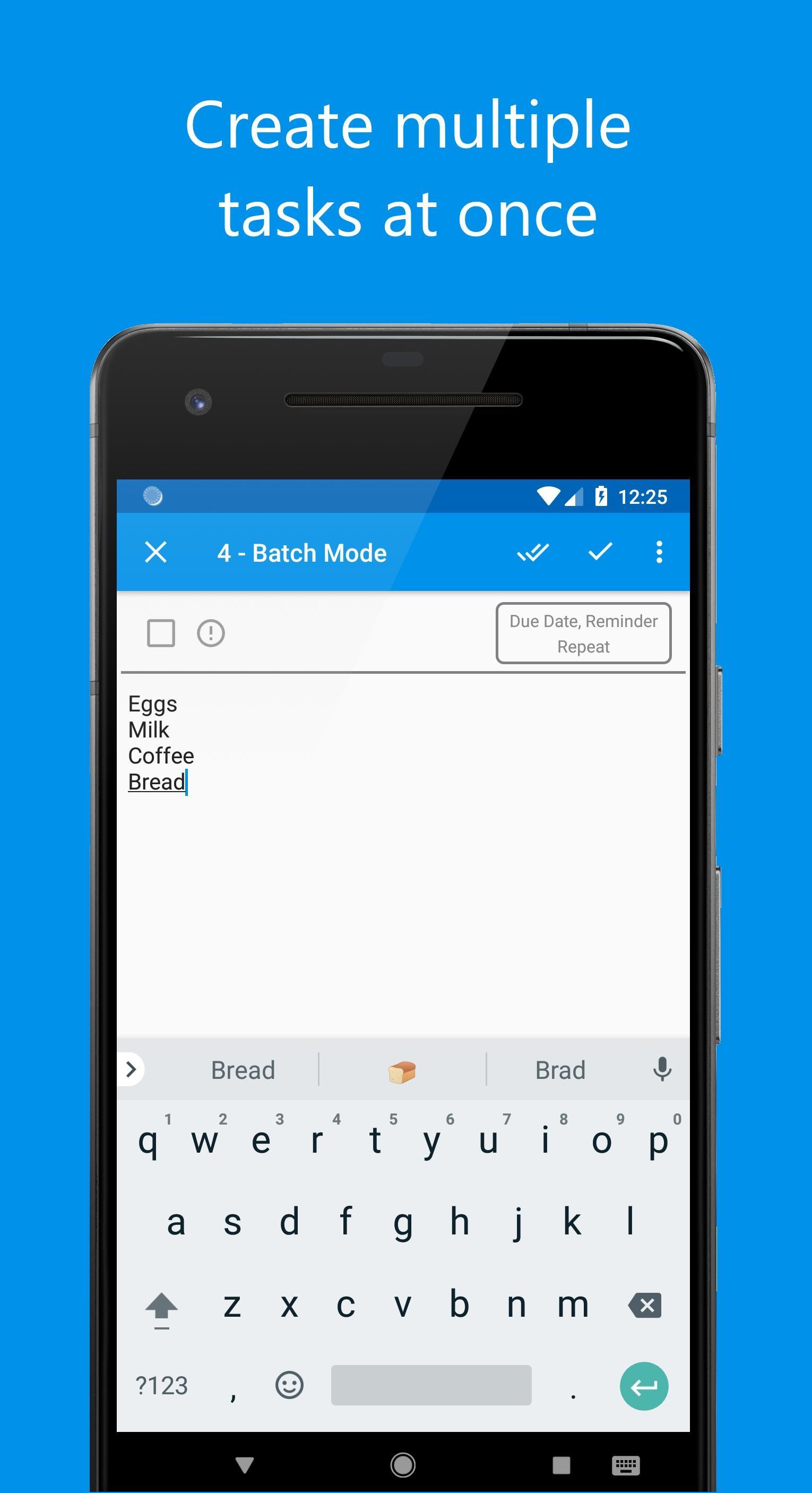
- Add multiple tasks at once in batch mode.
Complete Feature List
- Sort Tasks - Choose from four different sorting options: due-date, urgent, alphabetic or user-defined order.
- Sub-tasks - When using user-defined order, drag and drop to change order, and to create sub-tasks.
- Expand/Collapse sub-tasks tree to avoid visual clutter.
- Choose to hide/show completed tasks.
- Choose to automatically move completed tasks to bottom of the list.
- Tag tasks as urgent to make them stand out.
- Notebooks - Organize your lists into notebooks. Swap notebooks with the click of a button.
- Move tasks across lists, and lists across notebooks.
- Color code lists for easy identification.
- The 'All Tasks' List - See all your tasks from all your lists in one place, either sorted by due-date or by list name.
- Quickly create tasks from the Quick Task toolbar.
- Search Tasks - Perform an alphabetic search to instantly find the tasks you are looking for, and edit them there and then.
- Reminders - Set reminders to get reminded before, or at the due time with notifications.
- Recurring Tasks - Set a repeat frequency, so that the task's due date and reminder is automatically updated when it is marked as completed.
- Set custom repeat frequencies such as every X weeks, months or days etc.
- Set recurring tasks to repeat at intervals from date of completion.
- Multiple Themes - Choose between a light and a dark theme.
- List Widget - Choose any list from any notebook, belonging to any account, to show on the widget.
- Mark tasks as complete, add new tasks, or navigate to a task directly from the widget.
- Icon Widget - Open a particular list, or add a new task to a particular list from the home screen.
- Interactive Notifications - Mark tasks as completed, or snooze task reminders from the notifications.
- Add a Status bar in the notifications area, to view your overdue and today's tasks.
- Multiple Accounts - Use a local account or add multiple Google Tasks Accounts. Switching between accounts is easy.
*Limitations*
- Features not supported by Google Tasks such as notebooks, recurring tasks and reminder times are NOT synced across devices.
- Move to SD card is not allowed because it can cause Widgets and Reminders to malfunction in certain situations.
- In Android 6 (Marshmallow) and above versions, battery optimizations on some devices can block Reminder notifications. Please add When.Do to the exception list of your battery manager.
*Permissions*
- GET_ACCOUNTS: Required to see Google Tasks Accounts on your device for Google Tasks sync.
- WRITE_EXTERNAL_STORAGE: Required for custom notification sounds and backup/restore functionality.
Privacy Policy: http://www.vrproductiveapps.com/privacy-policy.html
Localization
- English
- Russian (by Aliaksandr Malinouski)
- Italian (by Pierfrancesco Passerini)
- Portuguese(BR) (by Lucas Stamper)
- Spanish (by Juan Carlos San Román)
- Bulgarian (by Boby)
- Chinese (Traditional) (by Kai)
- German (by Ian)
- Czech (by Jozef)
- French (by Arnaud)
- Dutch (by Michiel van Erp)
For feature requests or bug reporting, please email vrproductiveapps@gmail.com
If you want to help translate the app, please email vrproductiveapps@gmail.com
Icons are provided by icons8: https://www.icons8.com
Latest Version
5.0.3Uploaded by
علي مهند
Requires Android
Android 4.0.3+
Category
Free Productivity AppContent Rating
Everyone
Security Report
Report
Flag as inappropriateLast updated on Aug 6, 2020
*Version 5.0.3*
- Fixed issue with creating local backup on some Android 10 devices.





APKPure - A multi-platform app store primarily focused on Android, providing extensive app-related content. Discover the app you want easier, faster, and safer, with quick and efficient downloads and installations.