


Package Name:com.alwaysondisplaywidgetandwallpaper.standbyforalldevice
SHA-256:d716067262eac841832cb50fbc2639a8737c8b95a917efba75dca94b47b52bc8
Show More
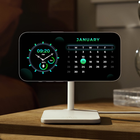
StandBy mode turns an android into a smart display with widget-sized clock styles, weather reports, and photo slideshows. It also acts as a hands-free hub, allowing you to ask voice assistant queries or control your HomeKit-enabled smart home devices with your voice.
StandBy mode can be enabled on an running Additionally, you can enable night mode, which presents elements in the StandBy mode with a red tint after sunset. StandBy mode does not display any sensitive information.
Standby Mode as one of the biggest features for android device, StandBy Mode turns an your phone into a smart display with widget-sized clock styles, weather reports and photo slideshows.
Based on what we've seen, it seems like StandBy will be intuitive way to give the your phone more ambient uses. As demonstrated, StandBy is optimized by phone stands that you'd place on your nightstand or around your home.
While in StandBy Mode, your phone will recognize what information what you might want to see at a certain time of day. If you have multiple MagSafe mounts around your space, will adjust the display to what information you prefer to see in that location, too.
For reference, the Echo Show 8 can be used as a bedside alarm clock and touch-screen enabled smart home View.
The idea is to provide users with information about, time, date, notifications and more and all without having to touch the phone. Just by looking at it.
This is made possible thanks to AMOLED displays. Most of the screen stays black except for a few pixels.
★ Notable features
• StandBy Clock
• StandBy Display
• StandBy Calender
• Always On Screen
• Notifications - view notifications without touching your device
• New: Now featuring raise to wake!
• New: Backgrounds and wallpapers!
• New: Edge glow for new notifications!
• New: Quick note taking! Quickly scribble or write from the always on display
• StandBy Sildeshow
• Music - control your music quickly and easily!
• Automatic rules - preserve battery using predefined rules
• Auto movement - avoid AMOLED burn-in
• Auto night mode - dim the screen automatically in dark environment
• View the weather at a glimpse
• You can set multiple alarms.
• You can set different ringtones for different alarms.
• It has features like repeat and snooze.
• You can set a countdown and it rings out loud when it gets over.
• Has a stopwatch with the lap feature.
• It has 100 plus different themes for big digital Standy Mode.
Take a look at your phone and have everything you need in one place: the time, the date, the battery state, your notifications, and more.
As an additional feature you can enable charging and headphones animations that appear when plugging in headphones or your charging cable.
Latest Version
2.12Uploaded by
Amira Emad
Requires Android
Android 6.0+
Category
Free Tools AppContent Rating
Teen · Mild Violence
Security Report
Check Now
Report
Flag as inappropriateLast updated on Dec 22, 2024
Minor bug fixes and improvements. Install or update to the newest version to check it out!




APKPure - A multi-platform app store primarily focused on Android, providing extensive app-related content. Discover the app you want easier, faster, and safer, with quick and efficient downloads and installations.











