Scan Date:Nov 17, 2026
Show More

New: the speed alarm keeps working in the background, even with the screen off or while you use maps and other apps.
Android users rejoice. Your phone is now a fully functional analog/digital speedometer. At the same time the app is also a speed alarm to save you from speeding tickets.
Speedometer Features
This app is a GPS Speedometer for your smartphone. The features include:
* Analog and digital speedometer based on your mobile phone's built in GPS
* Supports different scales including Kilometers per hour (km/h), meters per second, miles per hour (mph) and knots speed scales.
* You can change this scale any time on the move.
* This mobile speedometer also features a speed alarm. Set a speed cap and your phone will warn you.
* You can enable or disable alarm
* Great design and easy to use application on all popular mobile platforms.
Features in detail
Speedometer
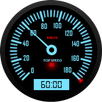
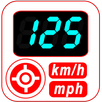
This mobile GPS speedometer features a fully functional speedometer with both analog as well as digital speed display. Analog meter shows speed just like your car's speedometer using a dial and a needle. Digital speedometer will show current speed in digits.
Speed Alarm
You can set an alarm for a specific speed. As soon as you go beyond that speed, the alarm will start buzzing. It will alert you if you go beyond your speed limit. You can have many possible ways you can use this alarm. See following section.
Where to use?
Either you are in a bus, train or any other public transport and wonder what is the current speed of this vehicle, Speedometer to your rescue. Just launch the app, wait for a couple of seconds for the GPS to lock and you are ready to go.
Warning!
Please do not use the app while you are driving. If you want to change settings or modify the alarm, first park your car on the road side and then operate your mobile phone. Using mobile phone while driving is dangerous for you and other people on the road.
Latest Version
7.2Uploaded by
ابراهيم مهدي الهاجري
Requires Android
Android 6.0+
Category
Free Lifestyle AppContent Rating
Everyone
Security Report
Report
Flag as inappropriateLast updated on Nov 18, 2026
New: the speed alarm keeps working in the background
• Switch to another app or turn the screen off: while the speed alarm is on, your speed is still measured and the alarm still sounds
• Your speed in a notification, with a Stop button
• You can turn this off in the menu
• A warning when media volume is off



APKPure - A multi-platform app store primarily focused on Android, providing extensive app-related content. Discover the app you want easier, faster, and safer, with quick and efficient downloads and installations.