
Smart Settings is a tool to automate and optimize device settings, for both context-awareness and power saver.
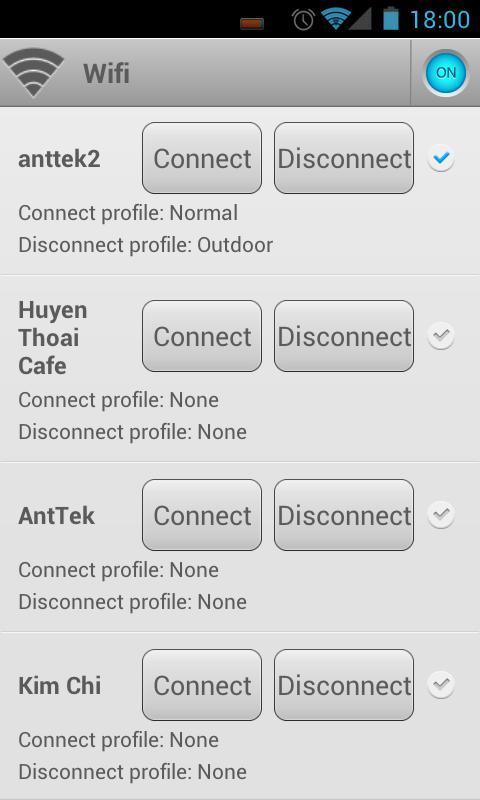
For example, when the device connect to meeting room’s Wifi, the “Meeting” profile will be automatically activated, or when you leave your company’s Wifi, it turns to “Outdoor” profile.
How Smart Setting works
A profile is a group of device settings, including:
☆ Network (airplane mode, Wifi, mobile data, GPS, bluetooth),
☆ Ringer (volume, ringtone, vibrate),
☆ Notification (volume, ringtone, vibrate),
☆ Alarm (volume, ringtone),
☆ Display (brightness, wallpaper)
☆ Other settings (sync, media, DTMF, voice call, system).
One can use pre-defined common profiles and custom profiles
☆ Normal,
☆ Silent,
☆ Outdoor,
☆ Battery Saver
☆ Last known profile (special profile to restore last settings)
☆ Custom profiles (as many as you want)
A profile can be activated manually or by an event.
3 types of events:
☆ Battery: when battery drops to a certain level (highest priority)
☆ Wifi: connect or disconnect to a wifi network
☆ Time: specific time or repeatedly (lowest priority)
more events will be added in next versions.
Profile activation:
☆ Automatically: An event can be mapped to a profile. When an event is triggered, the mapped profile will be activated. If a event is triggered while a profile is activated by a higher priority event, it may be ignored.
☆ Manually: 5 ways to manually activate a profile:
- Notification bar: configure which profile will be displayed in the notification area.
- Quick switching screen: A new shortcut will be shown in your app drawer. You can select a profile in this screen.
- Toggle “star” icon on Profiles tab
- Create shortcut on home screen
- Using 1Tap Quick Bar app. As notification bar, but alot of customization.
kw: battery saver, context-aware, ifttt, tasker, toggle
Website: http://rootuninstaller.com/smart-settings/
Facebook: http://goo.gl/Brr99
Latest Version
1.41Uploaded by
حسين علي
Requires Android
Android 2.1+
Category
Free Tools AppContent Rating
Everyone
Report
Flag as inappropriateLast updated on Aug 4, 2015
V 1.4
- Added more setting for battery event
- Change battery event function for less battery consuming
- Fixed minor bugs
Full change logs: http://rootuninstaller.com/smart-settings/change-logs/
Website: http://rootuninstaller.com/smart-settings/
Facebook: https://www.facebook.com/RootUninstaller





APKPure - A multi-platform app store primarily focused on Android, providing extensive app-related content. Discover the app you want easier, faster, and safer, with quick and efficient downloads and installations.