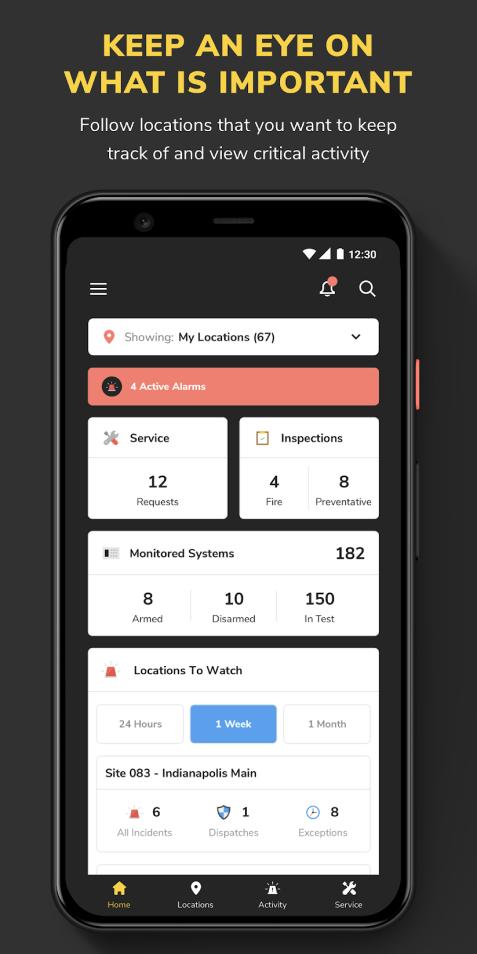
Security HQ empowers you to manage and respond to your security operations smarter, faster and from anywhere. The HQ app provides a modern and easy to use way to keep an eye on your location activity, access critical notifications in real time, and submit service requests for your alarm systems serviced by Securitas Technology, Inc. - anytime and anywhere!
To get started simply download and install the HQ app on your device and log in using your eServices user credentials. If you don’t already have an account, contact your administrator or the Security HQ customer service team to find out how to get an account.
NOTE: Appropriate user level permissions are needed in HQ to enable all features of the application. Contact your administrator to ensure you have the permissions you need.
Latest Version
2.85Uploaded by
Ñgàÿ Måį-Ñắñq Łëñ-Åñh ŠẽVề
Requires Android
Android 5.0+
Category
Free Business AppContent Rating
Everyone
Report
Flag as inappropriateLast updated on Apr 13, 2023
Minor bug fixes and improvements. Install or update to the newest version to check it out!



APKPure - A multi-platform app store primarily focused on Android, providing extensive app-related content. Discover the app you want easier, faster, and safer, with quick and efficient downloads and installations.