Scan Date:Feb 4, 2023
Package Name:com.smartartstudios.retrofree.interactive.watchface
SHA-256:8f9075418c8479b1c22405373d74c8215c9001b7b58c120ca136f9d375766e11
SHA-1:91174681c498f2e42877fd8f7778efa8486b3106
Show More
💡IMPORTANT - Not compatible with Samsung Smart Watches that use Tizen OS.
★Be Ready for the Unique Retro Style look on your Wrist and Phone with Modern Features
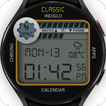
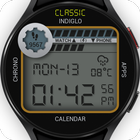
★Retro Digital Watch Face !! A Unique Retro Style Watch face and Clock Live Wallpaper with Hourly Chime Sound effect, Touch Sound Effects and many Interactive Features for Wear OS 3.0 Watches and Phones.
★Tap Features:(*Available Only in Premium Version)
❖ Tap on "CHRONO"on Left side of Watch face for Interactive Stop watch.
❖ Tap on "APPS" on Right side of Watch face for Apps Launcher Menu.
❖ Tap on "CALENDAR" on Lower side of Watch face for to get Agenda.
❖ Tap on "INDIGLO" on Upper side of Watch face for GLOW MODE.
❖ Tap on WEATHER on main Watch Face to get 4 days Weather Forecast and Other Weather Info.
❖ Tap on DIGITAL CLOCK to Change Colors.
❖ Tap on DATE to Change Date like ( Month Name/ Day Name).
❖ Watch Face Fusion is fully compatible with Wear OS 3.0 (Android Wear)
❖ Wear OS 3.0 integrated Features:
• Fully standalone
• iPhone and Android compatible
❖ Retro Digital is fully Compatible with all Android Wear (Wear OS) watches resolutions.
★ Free Version
❖ Unique Retro Style Digital Watch Face.
❖ Wear OS 3.0 Fully supported.
❖ Standalone watch face for iPhone and Android users.
❖ Phone and Watch battery
❖ Date, Day, Month Name
❖ Black & White Ambient Mode
❖ Leading zero
❖ Clock Live Wallpaper
★ Premium Version Features
❖ All features from FREE version.
❖ Wear OS 3.0 External complications Support.
❖ 2 Retro Style Watch Face Modes.
❖ Hourly Chime Sound effect and Vibration on every hour
❖ Touch Sound Effect and Touch vibration
❖ Retro Style Digital Watch Face & Clock Live Wallpaper.
❖ 11 Live Wallpaper Backgrounds
❖ Double Tap on Wallpaper to Speak Time
❖ Stop Watch For Sports Activity
❖ Special Night Glow mode, Activate with one Touch
❖ Custom App Launcher Menu
❖ Weather info and Forecast for Next 4 Days, High/Low Temp, Wind Speed, Sunset/Sunrise info
❖ GPS or Manually Select Weather Location Option
❖ Fully Accurate Steps with Google Fit Integration
❖ Switch Between Month name and Day name on Date with one Touch
❖ Screen Time Option
❖ Custom Brand Name on Watch Face
❖ 12/24 Hour Digital Clock
❖ 2 in 1 Ambient Modes
★How To Use
1. You Can Enable or Disable Sound effects and Vibration from Companion app.
2. Please Enable "Location" or "GPS" in Phone To get Weather Info, with Active Internet Connection,
3. Select Manual Weather Location in Companion App Settings To Set Your Manual Weather Location.
4. Change Custom App Shortcuts from Phone Settings
5. Change Custom Name through app settings
6. Click on SET WALLPAPER Button to Apply Live Wallpaper.
★How do I install the watch face on Android Wear 1.0?
1. After install run 'Re-sync app' from the Android Wear app
2. Long press your watch and choose "Retro Digital Watch Face" as your watch face, or select the watch face using the Android Wear app
★How do I install the watch face on Wear OS 2.0 & 3.0 ?
1. Install it from Google Play Wear Store on your watch.
2. Install the companion app for fully customization (Android phones).
★Useful Tip
✔ Sometimes you need to wait longer for transfer to watch
✔I recommend a bit of patience .
✔This is not caused by the watch face, but rather Android Wear app.
✔ If the watch face is not shown on your watch after few minutes, to try re-sync or follow these steps:
1. Disconnect devices (watch and phone)
2. Uninstall the watch face
3. Restart watch and connect device again
4. Then finally install the watch face
★Visit Our Exclusive Wear face collection for Android Wear on the Play Store https://goo.gl/RxW9Cs
IMPORTANT NOTE: Your watch Must have speaker to for Sound Effects.
NOTE: if you have any problem first email us before leaving a 1 star rating on play store.
Latest Version
1.71Uploaded by
Sahil Samnani
Requires Android
Android 4.3+
Category
Free Personalization AppContent Rating
Everyone
Security Report
Report
Flag as inappropriateLast updated on Feb 24, 2022
V 1.71
❖ Fix weather update error, and other some minor bugs.
V 1.69
❖ Fix some necessary internal bugs.(Must Update)
V 1.68
❖ Fix Apps shortcut issue on new watches.
V 1.67
❖ Fix Google fit Stats , Steps, Distance and Calories data now exact matches with google fit app data.
❖ Fix Weather automatically update. Now weather updates automatically and more accurately.
❖ Fix Temperature value when temp is in minus.
❖ Fix phone battery update.
❖ Fix hourly vibration/sound off timing(sometime).



APKPure - A multi-platform app store primarily focused on Android, providing extensive app-related content. Discover the app you want easier, faster, and safer, with quick and efficient downloads and installations.