

Scan Date:Nov 16, 2024
Show More
Let's manage your important passwords in PassMemo.
PassMemo can manage your various passwords easily.
This App has a lot of function but its size is small.
For example …
* Backup data to encrypted file.
* Can launch PassMemo from mushroom.
This App doesn't connect to outside server except AdMob Service.
You can keep your password data safety in your phone.
[Features]
*Export to / Import from [MyPocket] (ver3.0.0)
* PassMemo manages your password data by groups. (ver2.0.0)
Please set the category of each password data.
* Sort (ver2.0.0)
-by Registration Date
-by Title
-by Frequency of use
-by Category
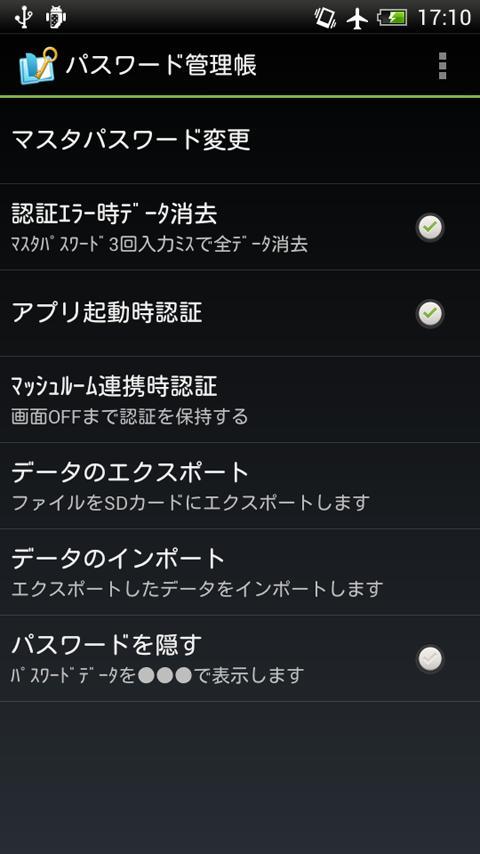
* Display the password in ●●●(ver2.0.0)
* Master Password protection
If you set Master password, the app ask the password every time you launch the app.
(If you don't need the password protection, you can change this setting.)
* Protect your password data strictly.
If you miss to input the Master password 3 times, PassMemo will delete all password data.
(You can change this setting)
We recommend to save your password data in the backup files.(Use "Export Password data")
You can restore Backup data when you lost data in current App.
* Manage your password with various information.
Following data available
>Title
>LoginID
>Password
>URL
>Memo
>Category (Added in ver2.0.0)
* Use mushroom
You can input ID or Password to the web browser using Mushroom.
--How to input these data--
>Tap the input area of web page.
>Select Mushroom of the keypad.
>Select PassMemo in the List of application
>Find the data you need and tap it
Some browser is not support copying characters from mushroom.
* Launch browser from PassMemo App
Set the URL then you can easily show the web page from launcher icon.
* Easy restore a saved password data
You can export Password data that you registered in PassMemo to a file in your SD card.
Exported file is encrypted.
You can import the exported data into another android device.
So it's easy to transport data when a device changed.
[Caution] You need password to restore password data.
The password is Master password when you export data.
Remember the password.
If there are same titles, PassMemo overwrites the data in the application with imported data.
Latest Version
4.1.6Uploaded by
مصطفي سعدون فتحي سعدون
Requires Android
Android 5.0+
Category
Free Tools AppContent Rating
Everyone
Security Report
Report
Flag as inappropriateLast updated on Nov 16, 2024
・Android14に対応しました。



APKPure - A multi-platform app store primarily focused on Android, providing extensive app-related content. Discover the app you want easier, faster, and safer, with quick and efficient downloads and installations.








![SD Masters [安全運転支援] APK](https://image.winudf.com/v2/image1/anAuY28ubnN3LmFuZHJvaWQuc2RtYXN0ZXJzX2ljb25fMTU2NzAyMzUzMF8wOTY/icon.png?w=102&fakeurl=1)