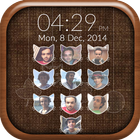
After the success of Photo Pattern Lock Screen and My Photo Lock Screen, Rich Media Apps brings you the very best New Passcode Photo Lock Screen!!! Allows you to customize the Lock screen passcode by adding images to each of the buttons with custom shapes now.....
If you love customizing your device, you’d probably be interested in a unique new feature that allows you to customize the passcode keys on the Lock screen. Choose from different sweet shape and 50+ in-built Background Images to customize your Photo Lock Screen.
HOW TO USE :- You’ll find a toggle that allows you to enable or disable the tweak and a Choose Images’ button which will take you to a new interface where you can add a photo to each of the passcode buttons from the stock Photos app or even take a picture instantly and use it. These images will appear right behind the keys as you can see from the screenshot above.
Features:-
* Select from a wide range of inbuilt backgrounds.
* Use sweet shape on passcode to a dashing keypad lock-screen. like Cats, Hearts, Shells, Circles, Leafs and many more...
* Choose the photo from gallery or click a new photo.
* Crop or re-size the photo you choose to have included.
* Choose to lock your phone under pin protection.
* Customize the fonts and color for your name, date and time on lock screen.
* Choose to enable or disable the date, name, or time format.
* Choose to enable or disable the date, name, or time format.
* Lock screen on/off toggle switches.
* Totally FREE!!
Thanks for using this app, leave us your feedback and we will consider them for future updates!
Thank You...
Latest Version
3.1Uploaded by
Møhâmmëđ Mūśťåfā
Requires Android
Android 4.2+
Category
Free Lifestyle AppContent Rating
Everyone
Report
Flag as inappropriateLast updated on Oct 15, 2016
Version 3.1
- Minor bug fixes!
You can write review to our App.
Any comments, feedback and suggestions are welcome!



APKPure - A multi-platform app store primarily focused on Android, providing extensive app-related content. Discover the app you want easier, faster, and safer, with quick and efficient downloads and installations.